


ZGF Architects
PDX Reimagined: How a Digital Backbone Powered America’s Most Ambitious Airport Project

A new way to supercharge Revu with AI.

The Complete Guide to Construction Takeoffs in 2026


How to get started with Bluebeam takeoffs in a few hours
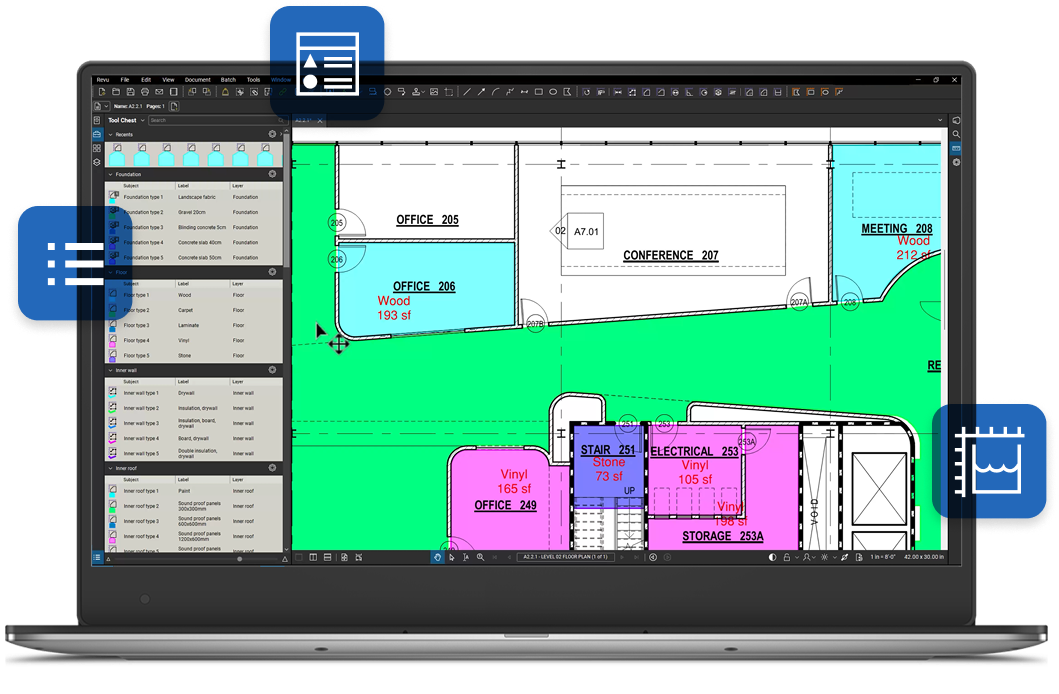
Bluebeam is known for having robust takeoff capabilities, so it’s no surprise that people are curious about what it looks like to get started. Fortunately, powerful workflows don’t equate to a steep learning curve. Most users can complete their first takeoff within a few hours and reach basic proficiency in under 2 days.
Getting started
Here’s what getting started looks like — including what’s fast, what takes longer and what to ignore until later.
Key takeaways:
- Most users run their first real takeoff within a few hours of learning the basics
- Bluebeam’s takeoff learning curve is comparable to other tools when users focus on the core feature set first
- Full production speed typically takes 3–6 months of regular use — but the tool pays off well before that
- The relevant feature set for takeoffs is narrow — roughly 20% of what Bluebeam can do
- The biggest barrier isn’t software skill, but knowing what not to learn first
- Structured training with pre-built tool sets cuts onboarding time roughly in half
What does "a few hours" get you — and what takes longer?
The honest answer: it depends on where you’re starting.
Here’s how the learning curve stages out:
Hours 1–2: Calibration, your first measurement, and the Markups List. This is where most people go from zero to “I can see why people use this.” Open a PDF drawing, go to Tools > Measure, pick a measurement type — length, area, count — click the drawing. Bluebeam calculates the value, it appears as a markup on the page, and it populates your Markups List automatically. That’s the foundation. Before anything else, calibrate your drawing scale against a known dimension on the sheet. Takes 30 seconds. Non-negotiable — PDFs get resized and rescaled all the time, and if calibration is off, every measurement downstream is off too.
Hours 3–8: Custom tool sets, VisualSearch, and running a complete takeoff on a practice project. This is where the platform starts pulling away from basic PDF tools.
Weeks 2–4: Production-level takeoffs with peer review. Your first live bid using Bluebeam — with all the pressure that implies. Expect it to take longer than it will six months from now. That’s normal.
Months 1–3: Team standardization, Quantity Link integration with Excel, and the kind of speed that makes the training investment look like a bargain.
The number most practitioners land on: 12–16 hours of focused learning to reach basic proficiency. That’s not a few hours and pretending otherwise sets people up to quit at hour eight when they hit the first friction point. But 12–16 hours spread across a few sessions is also not the months-long odyssey that bad reviews describe. Those reviews are almost always written by people who tried to learn the whole platform at once.
What should you learn first?
The relevant feature set for takeoffs is about 20% of what Bluebeam can do. The rest is markup, document management, and collaboration tools that are genuinely useful — just not on day one of learning takeoffs.
Here’s the core 20%:
Calibration. Already covered. Do this first, every time, on every drawing.
Snap to Content. When you’re tracing a wall or measuring a room, Bluebeam locks your cursor to the actual vector geometry in the drawing — the lines as they were designed. You’re not eyeballing. You’re not approximating. Snap to Content is why estimators with accurate, defensible numbers trust this tool.
Custom Tool Sets. Once you’ve configured your measurement tools — color-coded by trade, labeled by material — save them. Share them with your team. Standardized tool sets are what separate consistent company-wide takeoffs from five estimators each doing it differently. Creating your first set takes a couple of hours. Reusing it takes seconds.

VisualSearch. This is the one that changes things. Instead of manually clicking every electrical outlet on a 56-sheet plan set, you drag a box around one symbol and Bluebeam finds every instance across the entire document. A count of 2,870 fixtures in 2.5 minutes — that’s what this feature does. It’s not a novelty. It reshapes what’s possible inside a bid cycle.
The Markups List. Every measurement you place becomes a data record here — sortable, filterable, exportable. This is where your takeoff turns into something you can use downstream.

Is Bluebeam good for beginners — or only experienced estimators?
Bluebeam works for beginners. The software is learnable in hours. What takes longer isn’t the tool — it’s construction estimating itself. Reading plan documents, understanding construction sequences, knowing what to measure and what it means: that takes months or years, and no software shortens it. That’s true of every takeoff platform on the market.
If you can already read a set of drawings, Bluebeam’s takeoff feature set is accessible fast. If you’re learning estimating at the same time you’re learning the software, budget more time and lower your expectations for the first few months.

The users who struggle most aren’t beginners. They’re experienced estimators who’ve done manual takeoffs for years and resist changing a process that already works. If you’re in that camp: start with a completed project, not a live bid. Run the same takeoff digitally that you already ran on paper. See where the numbers land. The comparison usually settles it.
Is Bluebeam harder to learn than other takeoff tools?
No — Bluebeam is not harder to learn than other construction takeoff tools. Most users reach basic proficiency in a few hours, which is comparable to or faster than many other takeoff platforms.
The perception of a steeper learning curve comes from users trying to learn the entire platform at once, rather than focusing on the small subset of features needed for takeoffs.
The five mistakes that slow down your first takeoff
Most early friction with Bluebeam doesn’t come from the software — it comes from how people get started. The same small set of mistakes shows up again and again, and they’re all easy to avoid once you know what to look for:
1. Skipping calibration. Every measurement on an uncalibrated sheet is wrong. There’s no recovery except starting over. Calibrate first, every time.2. Trying to learn everything before running a takeoff. The platform has depth. That depth is a feature — it means Bluebeam grows with you. But on day one, ignore 80% of what you see and focus on the measurement tools.
3. Not saving custom tool sets. Building a careful set of color-coded, labeled measurement tools and then losing them at the end of the project is a genuinely demoralizing experience. Save them to the Tool Chest before you do anything else.
4. Ignoring the Markups List. Every measurement you take populates here. Totals, filters, export to Excel — all of it lives in the Markups List. Users who skip it are doing extra work manually for no reason.
5. Learning in isolation. Bluebeam has a large, active user community and free structured training. There is no reason to figure this out alone. The people who struggle the most are the ones who never asked for help.
When does the learning investment start paying off?
Faster than you’d expect. Digital takeoffs typically run 3–4x faster than manual methods once you’re up to speed — an 8-hour manual takeoff on a mid-size commercial project routinely comes in at 2–3 hours in Bluebeam. If you bid three projects a month and each takeoff currently takes a full day, the math on a 12–16-hour training investment is straightforward.
The other payoff is accuracy. One civil contractor caught a 15,000 vs. 13,600 lineal foot discrepancy on a single item — a $50,000 to $60,000 exposure — on the first project they ran through Bluebeam. The tool paid for itself that day.
The structured path from first measurement to production-ready
Here’s the learning roadmap, with honest time estimates:
- Revu Essentials + Takeoff Fundamentals (~90 min) — 5-Minute Workflows: Quantity Takeoffs in Revu is a free starting point. Get calibration and basic measurement working.
- Practice on a completed project (4–6 hours) — Use a project you’ve already priced. Run the digital takeoff. Compare to what you know. This is how you build confidence without risking a real bid.
- Measurement Tools for Takeoffs and Estimates (~90 min, free) — Self-paced Bluebeam University course that walks you from your first measurement to a reusable tool set.
- First production takeoff with peer review (your first live bid) — Budget extra time. Ask someone who knows the tool to review your work. Catch scale errors, missed scope, inconsistencies before pricing starts.
- Takeoff Data and Industry Workflows (~1 hour, free) — Another Bluebeam University course connecting your quantity data to bid-ready output.
- Build and share your team’s tool sets — Once yours are dialed in, standardize across the team.
Total investment to production-ready: roughly 20–25 hours, spread across a few weeks. The tool starts returning that investment on your second or third bid.
What happens when drawings change mid-takeoff?
One of the most common Bluebeam questions that nobody talks about: how does revision management work?
When addenda hit — and they will — Bluebeam’s drawing comparison tools let you overlay the new set against the old and visually identify what changed. You’re not starting over. You’re updating the measurements that moved. Because your quantities are tied to visible markups on the drawing, changes stay connected to their source — update the measurement, and the data follows. No hunting through disconnected spreadsheets for where the number came from.
This revision resilience is where Bluebeam’s depth pays off most visibly. A dedicated-takeoff-only tool gets you to your first number faster. Bluebeam keeps you accurate through the fourth revision.
The bigger picture
Getting started is just the beginning. Understanding how takeoff mechanics fit into a disciplined, repeatable workflow — one that holds up under revision pressure and peer review — is a different challenge. Calibration, visual verification, standardized tool sets, data that stays connected to its source through every drawing change: these aren’t just Bluebeam features. They’re the practices that separate takeoffs that hold up from ones that fall apart under scrutiny.

The Complete Guide to Construction Takeoffs in 2026 is where that full picture lives: modern workflow from drawing intake to data export, how to avoid the mistakes that cost contractors money after the bid is won, and what to look for when evaluating any takeoff platform against your real workflow needs.