


ZGF Architects
PDX Reimagined: How a Digital Backbone Powered America’s Most Ambitious Airport Project

A new way to supercharge Revu with AI.

The Complete Guide to Construction Takeoffs in 2026


Construction Takeoffs: The Complete Guide to Quantity & Material Takeoffs in 2026

What does it really take to turn a set of drawings into a buildable project? Before anything can be priced or scheduled, someone has to turn design into numbers, geometry into quantities, and quantities into informed decisions.
That’s where takeoffs come in.
This guide breaks down everything you need to know about construction takeoffs: what they are, why accuracy matters, how modern workflows operate, and how digital tools help teams produce takeoffs that are repeatable, reviewable, and resilient under change.
What is a construction takeoff?
A construction takeoff is the process of measuring and documenting everything shown on construction drawings that needs to be built.
At its core, a construction takeoff answers one question: What is represented in these drawings, in measurable terms?
That means counting, measuring, and quantifying the physical scope of work:
- Lengths of walls
- Areas of flooring
- Volumes of concrete
- Counts of fixtures or devices

The goal is to establish the project’s net, in-place quantities—what the drawings call for, before pricing, procurement decisions, or field waste come into play.
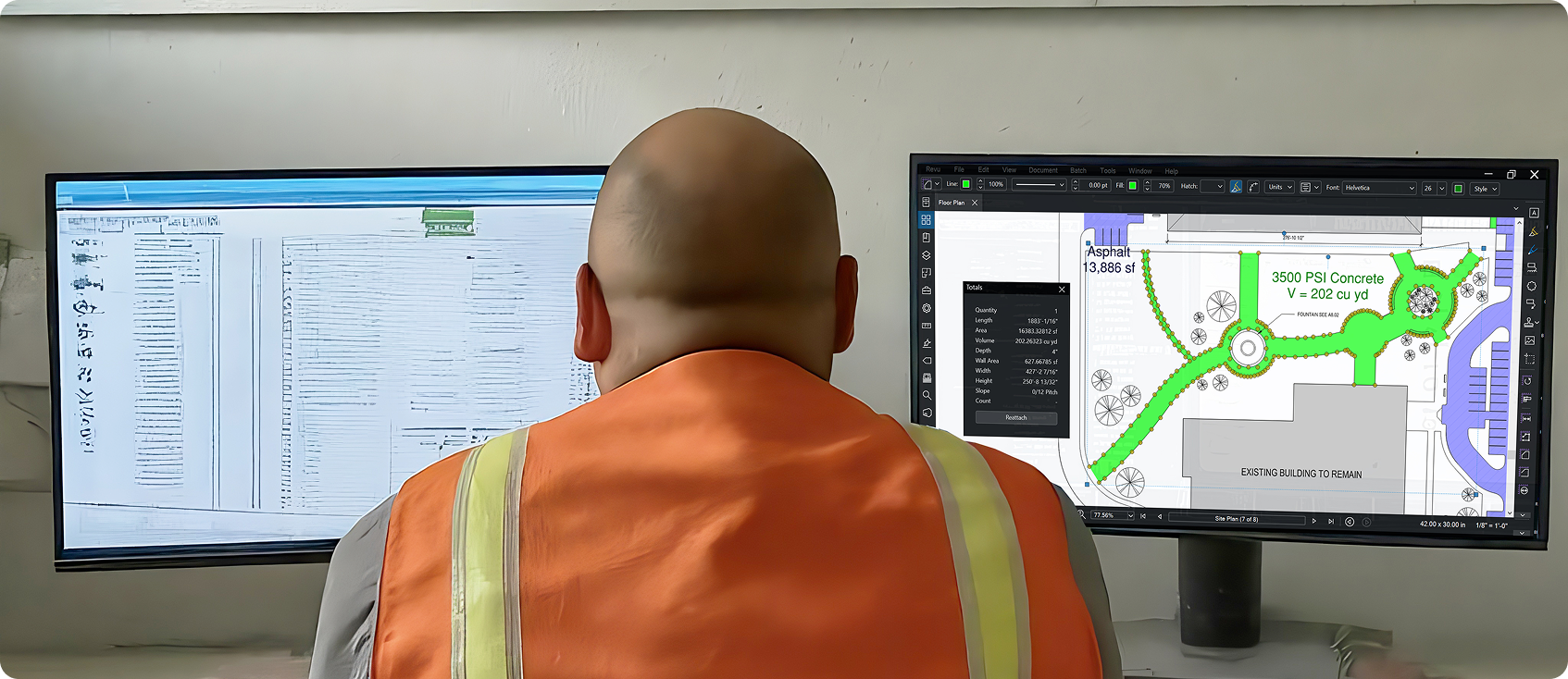
In modern digital workflows, those measurements are taken directly from PDF drawings. Estimators work on-screen, snapping to vector geometry and organizing quantities by trade, system, floor, or phase. Measurement tools in takeoff software like Bluebeam, for example, tie every measurement to both a visible markup on the drawing and a corresponding data record. You can see what’s been counted, how it was measured, and where it lives in the overall scope.
That visibility is how takeoffs stay reviewable. If you can’t trace a quantity back to a specific location on a sheet, you can’t confidently defend it to a reviewer, a project manager, or yourself six weeks later.
At its core, a construction takeoff is about scope clarity. It defines what’s included, what’s excluded, and what assumptions still need addressing before pricing begins.
Quantity takeoff vs. material takeoff vs. cost estimate
These three construction takeoff terms get used interchangeably. They shouldn’t be.
They represent three distinct steps in the estimating process, each with a different purpose. Blurring them makes estimates harder to review, revise, or defend.
Quantity takeoff (QTO): Defining net scope
The quantity takeoff is about what the drawings show.
It measures the net, in-place quantities required to build the project as designed. Lengths, areas, volumes, and counts are captured directly from construction documents, without adjusting for waste, packaging, or field inefficiencies.
Think of the QTO as the project’s geometric truth.
Examples:
- Square footage of flooring shown on the plan
- Cubic yards of concrete defined by slab thickness and footprint
- Number of light fixtures indicated on reflected ceiling plans
The key point: A QTO defines scope, not strategy. It answers what exists on paper, nothing more.
Material takeoff (MTO): Translating scope into procurement
The material takeoff builds on the QTO, but answers a different question: What do we need to buy?
This is where net quantities become gross quantities. Real-world constraints enter the picture:
- Waste factors (cuts, spillage, breakage)
- Packaging and standard sizes (sheets, bundles, lengths)
- Overlap and laps (roofing, rebar, siding)
- Overage for constructability (pump priming, uneven subgrade)
Examples:
- A concrete slab may measure 185 cubic yards in the QTO but require 195 cubic yards ordered
- A roof plan area may need additional material for hips, valleys, and starter courses
- Drywall takeoff may need more square footage than room areas imply due to sheet sizes and offcuts
The MTO is primarily a procurement tool — it supports purchasing, logistics, and delivery planning, not bid comparison or scope validation.
Cost estimate: Applying the financial layer
The cost estimate is where quantities meet money.
At this stage, quantities from the QTO (and adjustments informed by the MTO) are combined with:
- Material unit prices
- Labor productivity rates
- Equipment costs
- Indirect costs and general conditions
- Contingency and profit
This is the step that produces the final bid number.
But here’s the uncomfortable truth: No amount of pricing accuracy can fix bad quantities.
If the takeoff is wrong, the estimate will be wrong, whether it’s over- or underpriced. The quantity takeoff is the independent variable. Everything else depends on it.
Why keeping these steps separate matters
Experienced estimators are deliberate about where each decision belongs:
- QTO stays clean and auditable
- MTO reflects construction reality
- Cost estimating applies judgment and strategy
Keeping those layers distinct makes estimates easier to review, revise when drawings change, and explain to project teams after the job is awarded.
Why accuracy matters at the takeoff stage
In construction, accuracy isn’t a nice-to-have. It’s survival.
Most contractors operate on thin margins. On a good job, net profit might land in the low single digits. That leaves no room for compounding errors that start early and ripple through the rest of the project.
The quantity takeoff sits at the very front of that chain. When it’s right, everything downstream has a chance to line up. When it’s wrong, the estimate may still look reasonable on paper. But then the project starts.
Small quantity errors create outsized problems
A missed room. An unmeasured run of conduit. A slab thickness assumed instead of verified.
Individually, these sound minor. In aggregate, they’re how projects quietly lose money.
Because quantities drive almost every other decision, even small errors get amplified:
- Pricing is off, either too aggressive or too conservative
- Labor plans don’t match the real scope
- Material orders fall short or arrive in excess
- Schedules slip as crews wait for missing scope to be resolved
By the time the issue shows up in the field, it’s usually too late to fix cheaply.
The "Winner's Curse" starts with bad quantities
Underestimating quantities is one of the most common takeoff failures.
When scope is missed, bids come in low. The contractor wins the job, but not because they’re more efficient — because the estimate was incomplete. Recovering from that position often means relying on change orders, value engineering under pressure, or absorbing the cost outright.
Overestimation isn’t harmless either. Padding quantities to compensate for uncertainty makes bids less competitive.
Accurate takeoffs are what allow estimators to bid confidently, without hiding behind excessive contingency.
Accuracy is also about trust and accountability
Project managers rely on estimate quantities to build budgets and schedules. Superintendents rely on them to plan manpower and logistics. Procurement teams rely on them to stage deliveries. When those numbers don’t line up with reality, trust erodes quickly.
Digital workflows for takeoffs and estimation in Bluebeam make every measurement visible on the drawing and traceable in the data. That transparency makes it easier to review takeoffs, spot gaps, and have productive conversations about scope before the job is awarded.
Accuracy makes estimates easier to revise
No set of drawings stays static. Addenda happen. Clarifications come in late. Scope shifts.
When takeoffs are clean and well-organized, revisions are manageable. Quantities can be updated, differences can be isolated, and downstream impacts can be assessed quickly. When takeoffs are messy or assumptions are buried too early, every revision becomes a partial rebuild.
Accuracy at the takeoff stage isn’t just about getting the first number right, it’s about creating a foundation that can absorb change without falling apart.
How construction takeoffs have evolved
Construction takeoffs haven’t changed because the industry got bored with paper. They’ve changed because the scale, speed, and risk of construction changed, and the old methods couldn’t keep up.
What’s interesting is that the goal hasn’t shifted. Estimators have always been trying to answer the same question: What does this project require? What’s changed is how that answer gets produced, checked, and reused.

The Manual Era: Slow, fragile, experience-driven
For decades, takeoffs were done entirely by hand: paper plans, scale rulers, mechanical clickers, colored pencils to mark what had already been counted.
This approach forced estimators to “build the job mentally,” which wasn’t a bad thing. Experienced estimators developed strong intuition for constructability and sequencing. But the process had serious limitations:
- Measuring and tallying took a long time
- Arithmetic errors were easy to miss
- Revisions often meant starting over
- Peer review was difficult
- There was no durable audit trail
It worked. But then projects got larger, schedules tighter, and revisions more frequent.
The Digital Era: Same logic, better mechanics
The move to digital takeoffs didn’t change what estimators were doing—but how reliably they could do it.
PDF-based workflows allowed drawings to be measured on-screen instead of on paper. Geometry could be snapped precisely. Totals were calculated automatically instead of manually tallied. Revisions could be compared visually instead of remeasured blindly.
Platforms like Bluebeam accelerated this shift by treating the PDF as more than a static document. Measurements became both visual markups and structured data. Estimators could organize scope with layers, standardize tools, and export clean quantity reports without re-entering numbers by hand.
This era delivered real gains:
- Faster takeoffs
- Fewer math errors
- Better visibility into what was counted
- Easier collaboration and review
AI and automation for takeoffs
The latest evolution builds on digital workflows rather than replacing them.
Automation and AI-assisted tools focus on the most repetitive parts of takeoff: counting symbols, identifying rooms, and scanning large drawing sets for patterns. Visual search, optical recognition, and rule-based detection can surface hundreds of potential quantities in seconds.
With takeoff and estimating software like Bluebeam, features like Visual Search shift the estimator’s role. Instead of manually clicking every identical symbol, the estimator defines what to look for, reviews the results, and validates what gets counted. The human judgment stays in the loop.
This matters because drawings are rarely perfect. Symbols appear in legends. Details get reused. Context still matters. Automation speeds up the work, but it doesn’t remove responsibility.
What hasn’t changed
Despite all the technology, some fundamentals remain constant:
- Drawings still require interpretation
- Assumptions still need to be made explicit
- Quantities still need to be reviewed
- Construction knowledge still matters
The biggest risk in modern workflows is overconfidence. Treating software output as truth without verification.
The most effective teams combine modern tools with disciplined processes: calibration, visual verification, standardized workflows, and peer review.
Modern takeoff workflow (Step-by-step)
Modern takeoffs aren’t faster because estimators are rushing. They’re faster because the workflow is structured, repeatable, and built to surface mistakes before they turn into real costs.
While every firm has its own nuances, high-performing estimating teams tend to follow the same basic sequence. The tools matter, but the order matters more.
Step 1: Drawing intake and scope familiarization
Before a single measurement is placed, the estimator needs context.
That starts with reviewing the full drawing set and specifications to understand:
- Project type and complexity
- Trade boundaries and handoffs
- Areas of ambiguity or missing detail
- Where assumptions will likely be required
This is also where estimators establish how the work will be organized: by trade, by floor, by phase, or some combination of the three. A clean structure up front makes everything downstream easier to review and revise.
Skipping this step is how scope gaps sneak in.
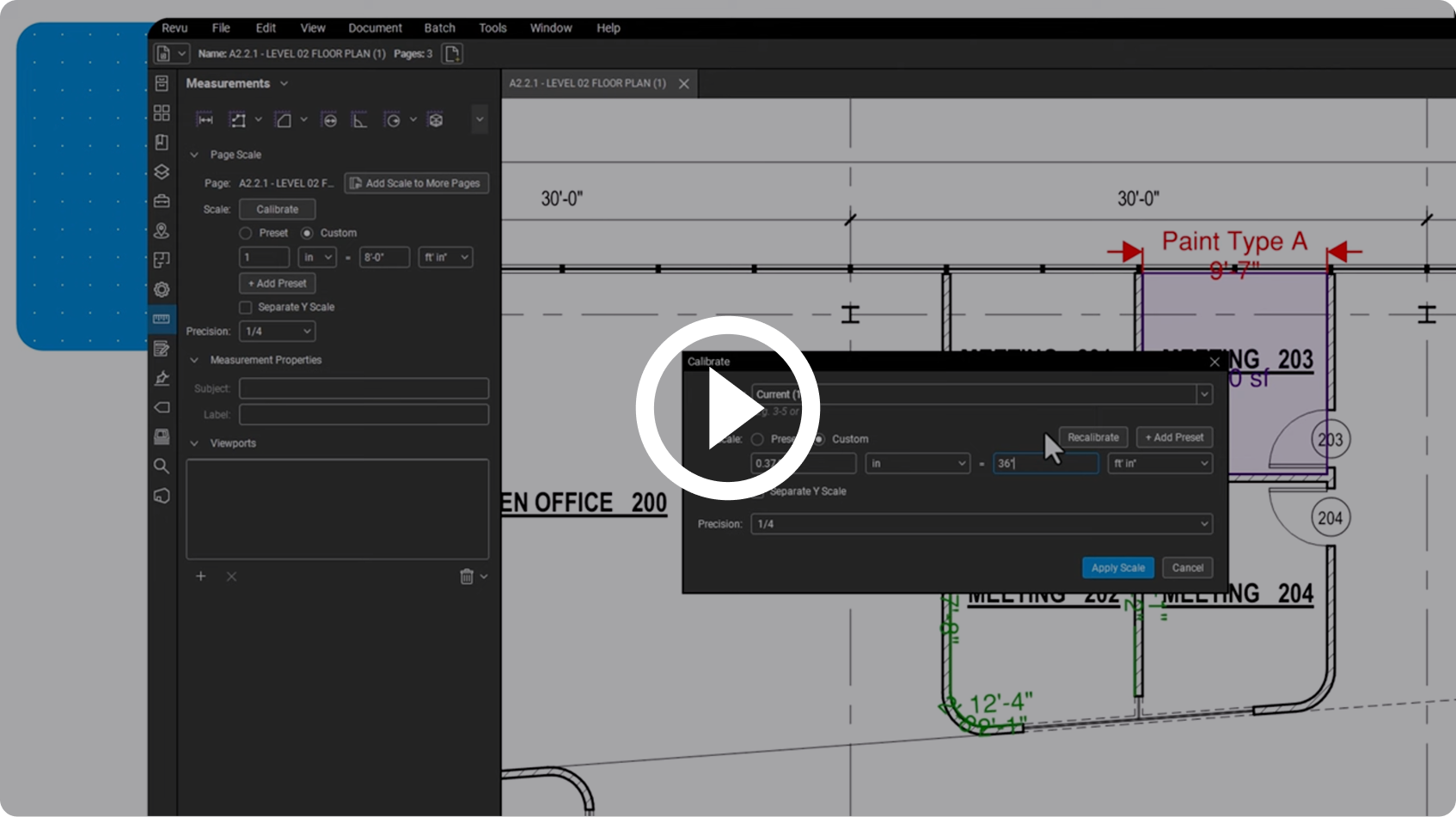
Step 2: Calibration (Non-negotiable)
Calibration is where digital accuracy is either locked in — or quietly compromised.
PDF drawings are frequently resized, scanned, or exported incorrectly. Relying on the printed scale alone is risky. Modern workflows verify scale by calibrating against a known dimension on the drawing, such as a gridline or dimension string.
With takeoff software like Bluebeam, calibration ensures every measurement taken afterward reflects real-world dimensions. Because if calibration is off, every quantity is off.
Step 3: Workspace and tool setup
Efficiency in takeoffs comes from standardization.
Before measuring, estimators typically:
- Load a dedicated takeoff profile
- Set up layers by trade or scope
- Prepare standardized tools in the Tool Chest
- Define naming conventions for subjects and labels
This upfront setup ensures consistency across drawings and estimators. It also makes exported data cleaner and easier to work with later.
Step 4: Measurement and quantity capture
This is the core of the takeoff.
Estimators measure:
- Counts for discrete items like fixtures or devices
- Lengths for walls, conduit, piping, and curbs
- Areas for flooring, roofing, and finishes
- Volumes for concrete, earthwork, and insulation
In digital workflows, each measurement does two things at once:
- It appears visually on the drawing
- It populates a data record in the quantity list
That visual component matters. Seeing what’s been measured— and what hasn’t — is how estimators self-check their work as they go.
Step 5: Organization and visual verification
As quantities accumulate, organization becomes critical.
Layers allow estimators to isolate scope visually. Colors differentiate systems or materials. Turning layers on and off quickly reveals missed areas, overlaps, or inconsistencies.
This is one of the biggest advantages of modern takeoffs: you can audit with your eyes. Review doesn’t require trusting a spreadsheet alone—it happens directly on the drawings.
Step 6: Validation and peer review
Good takeoffs don’t rely on a single pass.
Quantities are reviewed for:
- Obvious scale or magnitude issues
- Missing scope
- Duplicated measurements
- Assumptions that need clarification
In team environments, a second estimator often reviews the takeoff visually and in the data list. Questions get resolved before pricing begins, when changes are still cheap.
Step 7: Data export and integration
Once quantities are validated, they’re prepared for downstream use.
That might mean:
- Exporting quantities to Excel or estimating software
- Linking quantities directly into pricing templates
- Grouping data by trade, floor, or system
The key is that quantities remain traceable. If a number changes later, the estimator can see exactly what drove that change and update it at the source, not chase it across disconnected files.
Step 8: Revision management
No project stands still.
When addenda arrive, modern workflows isolate what changed instead of redoing everything. Updated drawings can be overlaid, revised areas remeasured, and impacts clearly identified.
Because quantities are organized and visible, revisions become adjustments, not rebuilds.
Clear structure. Verified scale. Visible quantities. Reviewable data.
Core takeoff tools and techniques
No estimator uses every tool on every project. What matters is knowing which tool to use, when, and why.
Modern takeoff platforms provide a range of measurement options, but the most effective estimators rely on a relatively small, repeatable set of tools and techniques. These cover most scope, reduce rework, and make takeoffs easier to review and revise.

Linear measurements: Walls, runs, and paths
Linear measurements are used for anything that follows a path: walls, curbs, conduit, piping, track, base, and edge conditions.
The key technique is measuring continuously, not piecemeal. Instead of breaking a wall into dozens of short segments, estimators trace a single continuous path wherever possible. This reduces both clicking and error.
In digital workflows, polylength-style tools allow estimators to:
- Follow turns and offsets accurately
- Capture total length automatically
- Apply consistent properties across the entire run
In Bluebeam, linear measurements also support rise and drop inputs, critical for capturing vertical travel in MEP systems that aren’t shown in plan view.
Best practice: Use different layers or colors for different wall types or systems. If everything looks the same on the sheet, review becomes harder than it needs to be.
Area measurements: Surfaces and finishes
Area tools are the backbone of finish and enclosure takeoffs.
They’re used for:
- Flooring and tile
- Roofing
- Drywall and paint (when measured by elevation or surface)
- Ceiling systems
The technique matters as much as the tool. Estimators should measure net areas, cutting out shafts, openings, and exclusions rather than applying rough percentage deductions later. Precision here keeps the QTO clean and defensible.
Best practice: Measure similar areas using the same tool configuration and subject naming. Consistency makes the data usable downstream.
Volume measurements: Turning 2D into 3D
Volumes are often misunderstood, especially in 2D-based workflows.
Concrete slabs, toppings, insulation, and earthwork all require volume calculations. Modern tools allow estimators to derive volume by combining:
- An area measurement
- A defined depth or thickness
- This approach avoids the need for complex 3D modeling while still producing accurate quantities.
Best practice: Separate volumes by mix, thickness, or specification. A single concrete number rarely tells the full story.
Count tools: Discrete items done right
Count tools are used for fixtures, devices, equipment, and other discrete items.
They’re simple, but critical. A missed device count can cascade into labor, wiring, conduit, and coordination issues later.
To scale counting efficiently, estimators increasingly rely on visual search techniques. Instead of clicking every symbol manually, they define a target symbol and scan the drawing set for matches. Results are reviewed, filtered, and then applied in bulk.
This shifts the estimator’s role from counter to reviewer—faster, but still accountable.
Best practice: Always review search results. Symbols in legends and details can look identical but shouldn’t be counted.
Tool sets and standardization
One of the biggest productivity gains comes from not rebuilding tools repeatedly.
Standardized tool sets store:
- Measurement type
- Color
- Layer
- Subject name
- Labels and properties
When every estimator uses the same tool for the same scope, takeoffs become more consistent and exports become far cleaner. Every tool feeds into one overarching technique: visual verification.
If it’s measured, it’s visible. If it’s visible, it can be reviewed.
Color-coded markups, layered scope, and clear organization allow estimators to validate their work directly on the drawings, not just in a spreadsheet.
This is what makes digital takeoffs resilient. When revisions arrive or questions come up, estimators aren’t guessing where numbers came from. They can see them.
Use cases and industry examples
Construction takeoffs matter most when the pressure is on: tight deadlines, complex scopes, and competitive bids. In practice, digital takeoff workflows show up across a few common scenarios:
- Preconstruction and hard‑bid estimating: Estimators use takeoff software to rapidly quantify scope across multiple bid packages, compare alternates, and respond to addenda without rebuilding every takeoff from scratch.
- Design‑build and value engineering: Teams quantify options to compare materials, systems, and phasing scenarios, then tie those quantities back to specific drawings so decisions can be defended later.
- Change orders and revisions: When drawings change, comparison and overlay tools help isolate what actually moved, so only affected quantities are remeasured.
- Civil and infrastructure projects: Contractors use digital takeoffs to handle large siteworks — volumes, areas, lengths — and to keep pace with frequent revisions typical of civil work.
- Repeat work and portfolio programs: Owners and contractors reuse standardized tool sets and templates so each new project’s takeoff builds on the last instead of starting from zero.
Across these use cases, the payoff shows up in a handful of measurable outcomes: faster takeoffs, fewer errors, less rework, and stronger bid outcomes.
Metrics and ROI of takeoff software
Teams that adopt purpose‑built takeoff tools generally track ROI in four buckets:
- Accuracy: Calibrated measurements, consistent tools, and visual verification reduce quantity errors that would otherwise surface as change orders or margin erosion.
- Speed: Automation, visual search, and reusable tool sets shorten the time from drawings received to “numbers ready for pricing,” which is critical on competitive, multi‑bid cycles.
- Rework reduction: When drawings are revised, comparison tools and organized markups mean estimators revise only what changed instead of redoing entire scopes.
- Bid success: Faster, more reliable takeoffs let teams pursue more opportunities and bid with greater confidence; many firms report higher bid volume or win rates after moving to structured digital workflows.
For example, Bluebeam highlights civil and specialist contractors that have increased the number of bids they can submit and improved speed and accuracy after digitizing their takeoff workflows.
What users say about leading digital takeoff tools
Reviews of leading digital takeoff platforms show a consistent pattern: better control over revisions, faster takeoffs once teams are trained, and more focus on higher‑value estimating work.
One verified Capterra reviewer using Bluebeam construction takeoff software notes that “the comparison tool is a lifesaver,” highlighting how drawing‑compare features make it easier to pinpoint changes and keep quantities aligned with the latest set. Another estimator who moved from manual workflows to digital takeoffs in Bluebeam explains that “once I learned the capabilities, digital takeoffs became fast and accurate,” underscoring the speed and confidence gains that come with a structured, PDF‑based process.
For practicing estimators, the real benefit often shows up as mental bandwidth. Niall O’Connor, Building Estimator at Forcia Limited, says that “Bluebeam makes it easier to do takeoffs so you can concentrate on the more difficult aspects of the project,” capturing how modern takeoff tools handle the mechanics of measurement so humans can focus on judgment, risk, and strategy instead.
How to choose construction takeoff software
Takeoff software doesn’t replace estimating judgment. It either supports it, or quietly works against it.
The problem isn’t a lack of features. Most platforms can measure lines, areas, and counts. The difference is whether the software reinforces disciplined takeoff practices or encourages shortcuts that are hard to detect until it’s too late.
If accuracy, reviewability, and revision resilience matter, here’s what to look for.

Accuracy and calibration controls
Accuracy starts with scale, not speed.
Construction drawings are routinely resized, scanned, or re-exported before they reach the estimator. Software that relies solely on the printed scale—without enforcing calibration—makes it easy to produce clean-looking quantities that are fundamentally wrong.
Strong takeoff and estimating software:
- Allows calibration against known dimensions
- Applies that calibration consistently across sheets
- Makes it obvious when a drawing hasn’t been verified
If calibration is optional or buried, accuracy becomes a matter of luck.
Auditability: Can you defend every quantity?
Takeoffs don’t fail in isolation. They fail during review.
Software should make it easy to answer a simple question: Where did this number come from?
Look for platforms that:
- Tie every quantity to a visible markup on the drawing
- Preserve that connection in the data
- Allow reviewers to trace totals back to specific locations on specific sheets
If quantities only live in a table or export, review becomes trust-based instead of evidence-based.
Revision and addenda handling
Drawings change. Software should expect that.
Takeoff tools should help isolate what changed instead of forcing full rework. The ability to visually compare revisions, update affected quantities, and understand downstream impacts is critical under real bid timelines.
Strong revision handling:
- Highlights differences between drawing versions
- Allows selective remeasurement
- Preserves original quantities for comparison
If revisions feel like rebuilds, the workflow is fragile.
Standardization across estimators
Consistency matters more than raw speed.
When every estimator measures, names, and organizes scope differently, quality becomes person-dependent. Software should help standardize the basics without removing judgment.
Key capabilities include:
- Reusable tool sets for common scope
- Shared profiles and layer structures
- Consistent naming and labeling conventions
Standardization reduces cleanup, simplifies review, and makes takeoffs comparable across projects and teams.
Data outputs and downstream integration
Takeoffs don’t end at totals.
Quantities need to move cleanly into pricing, procurement, and project planning without being retyped or reinterpreted. Look for software that treats takeoff data as structured information, not just annotations.
At a minimum, software should:
- Export clean, well-organized quantity data
- Preserve units, grouping, and naming
- Allow updates to flow from the source measurement
The closer data stays to its origin, the fewer errors creep in later.
Where tools like Bluebeam fit in for takeoffs
Bluebeam is designed to support disciplined, PDF-based takeoff workflows.
It’s particularly strong where visibility, reviewability, and revision control matter. In Bluebeam, measurement exists as both a visual markup on the drawing and a structured data record. That dual view makes takeoffs easier to audit, revise, and explain.
Many teams use Bluebeam alongside dedicated estimating systems. Bluebeam handles scope definition, quantity validation, and drawing-based review, while downstream tools handle pricing, assemblies, and cost databases.
Managing and validating takeoff data
Getting quantities measured is only half the job. Keeping those quantities organized, accurate, and defensible is what separates a usable takeoff from a fragile one.
Modern estimating isn’t just about measuring drawings. It’s about ensuring data can be reviewed, trusted, and reused as the project evolves.
Turning markups into structured data
Every measurement placed during a digital takeoff creates two things:
- A visible markup on the drawing
- A data record associated with that markup
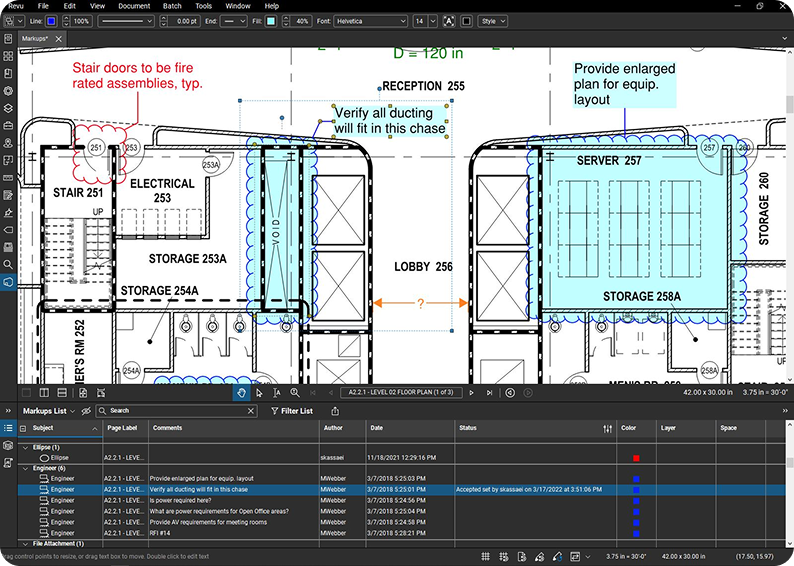
That data lives in a centralized list, where quantities can be sorted, filtered, grouped, and exported. This is where estimators move from “counting” to managing scope information.
In Bluebeam, this happens through the Markups List — a live table that tracks every property of every measurement, including length, area, volume, subject, layer, and status.
Using organization to prevent errors
Organization is the first line of defense against bad data.
Estimators typically manage takeoff data by:
- Assigning consistent subjects to measurements
- Separating scope using layers (by trade, phase, or system)
- Applying clear labels for location or specification
This structure allows quantities to be reviewed in logical groups instead of as a single massive list. If something looks off, it’s easier to isolate the issue quickly.
A pile of unstructured quantities might still add up correctly. But can you trust it?
Custom columns: Embedding logic where it belongs
One of the most powerful ways estimators validate data is by embedding simple logic directly into the takeoff environment.
Custom columns allow estimators to:
- Apply formulas to measurements
- Standardize naming through dropdown choices
- Derive secondary quantities automatically
For example:
- Converting area and thickness into concrete volume
- Calculating wall area from floor plan lengths
- Applying pitch factors to roof areas
By keeping these calculations tied to the measurements themselves, estimators reduce the risk of transcription errors and ensure that updates flow through automatically.
Visual review: The fastest quality check
Numbers alone don’t catch everything.
Visual review is a core validation technique. Estimators toggle layers on and off, scan drawings for unmeasured areas, and confirm that scope coverage looks complete.
This is where digital workflows shine. If a room isn’t colored, it probably wasn’t measured. If two layers overlap unexpectedly, something may have been counted twice.
The goal isn’t perfection on the first pass—it’s catching problems early, when they’re still easy to fix.
Status tracking and peer review
Takeoff data gets stronger when it’s reviewed.
Many teams use status tracking to manage this process. Measurements move from “in progress” to “reviewed” to “verified” as they’re checked. This creates accountability and makes it clear what’s ready for pricing.
Peer review is especially valuable on larger projects. A second set of eyes can spot scale issues, missing scope, or odd quantities that the original estimator might overlook.
Digital tools make this review faster because reviewers can see both the data and the markups that generated it.
Preparing data for downstream
Validated takeoff data doesn’t stay in isolation.
Once quantities are clean, estimators prepare them for:
- Export into spreadsheets or estimating systems
- Linking directly into pricing templates
- Grouping for procurement or scheduling
The key is that the data remains connected to its source. If something changes later, the estimator updates the measurement, not a disconnected copy of the number.
This is how modern workflows avoid version chaos.
Common takeoff mistakes and how to avoid them
Most takeoff mistakes aren’t dramatic. They’re small, quiet, and easy to miss. Then they show up later, as cost overruns, schedule pressure, or uncomfortable conversations.
The good news is that most of them are predictable. And once you know where estimators tend to get tripped up, they’re also preventable.

1. Skipping proper calibration
The mistake: Assuming the drawing scale is correct and measuring without verifying it.
PDFs get resized, scanned, and re-exported all the time. Measuring against an unverified scale can throw every quantity off, sometimes by just enough to slip past review.
How to avoid it: Always calibrate using a known dimension on the drawing. Treat calibration as non-negotiable, not optional.
2. Measuring before understanding the scope
The mistake: Jumping straight into measurement without fully reviewing drawings and specs.
This leads to missed scope, duplicated quantities, and assumptions that don’t align with the actual intent of the project.
How to avoid it: Start every takeoff with a scope review. Understand what’s included, what’s excluded, and where handoffs occur between trades.
3. Mixing quantity, waste, and pricing too early
The mistake: Baking waste factors, allowances, or pricing logic into the takeoff itself.
This muddies the data and makes it hard to audit quantities against the drawings later.
How to avoid it: Keep the quantity takeoff clean. Measure net scope first. Apply waste, procurement logic, and pricing downstream where they belong.
4. Inconsistent naming and organization
The mistake: Using different names, layers, or labels for the same scope across drawings.
This makes quantities harder to group, review, and export, and it increases the chance of double-counting or omissions.
How to avoid it: Standardize subjects, layers, and tool sets. If every estimator measures the same thing the same way, the data stays usable.
5. Over-trusting automation
The mistake: Blindly accepting automated counts or searches without review.
Visual search and AI-assisted tools are powerful, but they don’t understand intent. They’ll happily count symbols in legends, details, or schedules if you let them.
How to avoid it: Use automation to speed up work—then verify visually. Treat automated results as a draft that needs confirmation, not final truth.
6. Failing to visually verify coverage
The mistake: Relying solely on totals in a data table or spreadsheet.
Numbers might add up correctly while still missing entire areas of the project.
How to avoid it: Review takeoffs visually. Turn layers on and off. Scan for uncolored areas. If it’s not marked, it probably wasn’t measured.
7. Ignoring vertical and hidden scope
The mistake: Measuring only what’s visible in plan view.
Vertical drops, wall heights, slopes, and elevation-based quantities are easy to overlook, especially in MEP and finish trades.
How to avoid it: Account for the Z-axis explicitly. Use rise/drop inputs, depth fields, or formulas to capture vertical scope that isn’t shown directly.
8. Skipping peer review
The mistake: Assuming one pass is enough.
Time pressure makes it tempting to move straight from takeoff to pricing, especially on smaller jobs.
How to avoid it: Build in a review step. Even a quick second look can catch scale errors, missed scope, or duplicated measurements before they become expensive.
9. Treating revisions as rebuilds
The mistake: Redoing entire takeoffs when drawings change because quantities aren’t organized.
This wastes time and increases the risk of new errors.
How to avoid it: Organize quantities so changes can be isolated. Modern workflows allow estimators to update what changed, but not everything.
Most takeoff errors come from the same root cause: lack of structure. Clear organization, visible quantities, and disciplined workflows do more to prevent mistakes than working faster or clicking more carefully.
Standardizing takeoff workflows across teams
When every estimator has their own way of measuring, naming, and organizing quantities, quality becomes person-dependent. One takeoff is clean and reviewable. The next is a puzzle. That variability makes estimates harder to compare, harder to review, and harder to trust — especially as teams grow.
Standardization fixes that. Not by turning estimators into robots, but by removing avoidable friction so judgment can be applied where it matters.

Start with a shared structure, not rules
Standardization works best when it focuses on structure, not micromanagement.
High-performing teams align on a few core decisions:
- How scope is broken down (by trade, floor, phase, system)
- How quantities are named and grouped
- How revisions are tracked and reviewed
The goal isn’t to dictate every click. It’s to make sure two estimators measuring the same drawings produce outputs that look and behave the same.
Standardize tool sets, not just tools
Reusable tool sets are one of the fastest ways to enforce consistency.
A standardized tool set defines:
- Measurement type (count, length, area, volume)
- Color and line style
- Layer assignment
- Subject and label naming
When everyone uses the same tools for the same scope, quantities roll up cleanly and exports require far less cleanup.
This is where platforms like Bluebeam shine. The powerful Tool Chest in Bluebeam Revu turns best practices into repeatable standards.
Use Profiles to remove noise
Profiles matter more than most teams realize.
A dedicated takeoff profile removes distractions and puts the right panels front and center—measurements, layers, tool sets, and the data list. When estimators start from the same workspace, they spend less time setting up and less time improvising.
Profiles in Bluebeam, for instance, don’t enforce behavior directly. They guide it.
Agree on naming conventions (and stick to them)
Naming sounds boring until it breaks everything downstream. Teams should agree on:
- Subject names for common scope items
- Layer naming by trade or system
- Label conventions for locations or alternates
Consistency here pays dividends later. Clean naming makes quantities easier to filter, link, and audit—especially when data moves into pricing or project management systems.
Build review into the workflow
Standardization isn’t complete without review. Many teams formalize this with:
- Status markers (in progress, reviewed, verified)
- Defined handoffs between junior and senior estimators
- Visual review expectations before pricing begins
This doesn’t slow teams down. It prevents rework—which is always slower.
Treat standards as living systems
Standardization isn’t a one-time project!
As tools evolve and project types change, workflows should be revisited and refined. Teams that treat standards as living systems — not frozen rulebooks — get better over time without losing consistency.
The payoff: When takeoff workflows are standardized, estimates are easier to review, revisions are faster to manage, data flows downstream cleanly, and quality doesn’t depend on who’s assigned the job.
Most importantly, estimators spend less time fighting the process and more time applying judgment. No tool can replace that.
Frequently Asked Questions

What is a quantity takeoff in construction?
A quantity takeoff (QTO) is the process of measuring and counting the materials and components shown on construction drawings. It converts design information into measurable quantities that support estimating, pricing, procurement, and planning.
How do you do a quantity takeoff step by step?
A typical quantity takeoff follows this sequence: review drawings and scope, calibrate sheets, set up standardized tools and layers, measure quantities directly on the drawings, visually verify coverage, review for accuracy, then export validated data for pricing.
What’s the difference between a quantity takeoff and an estimate?
A quantity takeoff defines what needs to be built in measurable terms. An estimate applies costs, labor, and strategy to those quantities. Accurate estimates depend on accurate takeoffs—pricing cannot correct missing or incorrect quantities.
What’s the best takeoff software for contractors?
The best takeoff software supports accuracy, reviewability, and revision management. Contractors should prioritize calibration controls, visible audit trails, standardized workflows, and clean data exports over speed alone.
Is there free takeoff software?
Some tools like Bluebeam offer limited free versions or trials, but free software often lacks calibration controls, revision handling, and auditability. For professional work, most teams rely on paid tools to reduce risk. How do you ensure takeoff accuracy? Accuracy comes from disciplined workflows: calibrating every drawing, measuring net scope, organizing quantities consistently, visually verifying coverage, and reviewing takeoffs before pricing begins.
How long should a quantity takeoff take?
The time required depends on project size, complexity, and drawing quality. Well-structured digital workflows reduce rework and revisions, allowing estimators to spend less time measuring and more time validating results.
Key takeaways
Quantity takeoffs don’t fail because estimators don’t care. They fail when speed, pressure, and inconsistency creep in before structure is in place. The goal of a modern takeoff is clarity. Clarity that survives review, revision, and real-world construction.
Start clean, stay clean
- Review drawings and scope before measuring anything
- Calibrate every sheet using a known dimension
- Keep the quantity takeoff focused on net scope, not waste or pricing
A clean foundation makes everything else easier.
Make quantities visible
- If it’s measured, it should be visible on the drawing
- Use layers and colors to separate scope clearly
- Scan for unmarked areas before calling a takeoff complete
Visual verification catches mistakes faster than spreadsheets ever will.
Standardize what can be standardized
- Use shared tool sets for common scope items
- Align on naming conventions and layer structure
- Start from a dedicated takeoff profile
Consistency reduces rework and makes estimates easier to review, especially across teams.
Trust the tools, verify output
- Use automation and visual search to save time
- Review results before accepting them
- Treat software as an assistant, not an authority
Judgment still matters. The tools just help apply it faster.
Keep data close to Its source
- Update quantities at the measurement level, not downstream copies
- Export or link data instead of retyping it
- Preserve traceability from drawing to number
When changes come, you’ll know exactly where to look.
Build review into the process
- Pause before pricing to validate quantities
- Use peer review when possible
- Resolve questions early, while fixes are cheap
Catching an issue during takeoff beats explaining it during construction.
Think beyond the bid
A good takeoff doesn’t just help win work. It supports:
- Cleaner handoffs to project teams
- More reliable budgets and schedules
- Fewer surprises once the job starts
Modern tools make that possible. Disciplined workflows make it repeatable.
Explore how Bluebeam supports structured, reviewable takeoff workflows:
- Discover Bluebeam’s Takeoffs and Estimates capabilities
- Watch: Quantity Takeoffs Tutorial
- Learn more: Takeoffs and Estimation workflows
- Get help: Bluebeam support for takeoffs and measuring
- Training: Live Takeoffs and Estimation course
- Webinar: Ask the Experts – Quantity Takeoffs and Estimation
- Watch: Streamlining Quantity Takeoffs webinar
Table of Contents
- What is a construction takeoff?
- Quantity takeoff vs. material takeoff vs. cost estimate
- Why accuracy matters at the takeoff stage
- How construction takeoffs have evolved
- Modern takeoff workflow (Step-by-step)
- Core takeoff tools and techniques
- Use cases and industry examples
- How to choose construction takeoff software
- Managing and validating takeoff data
- Common takeoff mistakes and how to avoid them
- Standardizing takeoff workflows across teams
- Frequently Asked Questions
- Key takeaways

