


ZGF Architects
PDX Reimagined: How a Digital Backbone Powered America’s Most Ambitious Airport Project
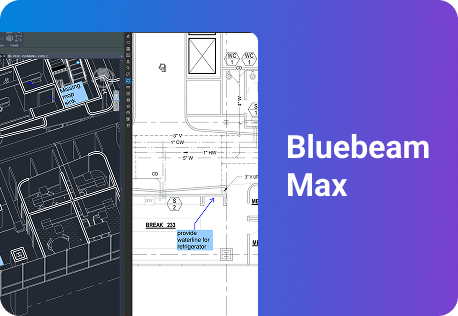
A new way to supercharge Revu with AI.

The Complete Guide to Construction Takeoffs in 2026


Construction RFIs: The Complete Guide for 2026
What a construction RFI is, how the RFI process works, how to write and track one, and how Bluebeam Max helps teams catch the conflicts behind RFIs before anyone has to ask.

Every construction RFI starts the same way: someone on the jobsite is looking at a drawing that doesn’t match what’s in front of them. A beam that lands in a duct run. A door with no hardware tag. A slab elevation that disagrees with the civil sheet. Until someone with the answer writes back, that piece of the work waits.
Multiply that wait by hundreds. A widely cited Navigant Construction Forum study of more than one1 million RFIs found the average project generated 796 of them, each taking about eight hours and $1,080 to review and answer.
For more than 20 years, Bluebeam has been where AEC teams mark up the drawings those questions come from. This guide covers what an RFI is, how the RFI process works, how to write one that gets answered, and how to track it. It also covers how AI is starting to catch the conflicts behind RFIs before they ever reach the field.
What is an RFI in construction?
An RFI in construction, or request for information, is a formal written question a contractor or subcontractor sends to the design team to clarify drawings, specifications or other contract documents. It documents the question, the answer and any cost or schedule impact, so the work can proceed as designed.
RFIs come up in every phase, but most land during construction, when crews hit something the documents don’t settle. Field teams use them to:
- Clarify design intent when a detail can be read two ways
- Resolve conflicts between drawings and specs, or between trades
- Fill in missing information, like an untagged door or a detail that was never drawn
- Address differing site conditions, when what’s in the ground doesn’t match the survey
The process is written into standard contracts. Under AIA Document A201-2017, the contractor must report errors, inconsistencies or omissions it finds “as a request for information,” and the architect must answer in writing “with reasonable promptness.” In the U.K. and Australia, teams typically track them in an RFI register.
What an RFI is not
An RFI asks a question. It doesn’t change the contract. A submittal shows how the contractor will build what’s drawn, and a change order changes scope, cost or time. Mixing them up clogs the log: in one dispute Navigant reviewed, more than 3,000 of roughly 4,000 “RFIs” turned out to be submittals, routine correspondence, substitution requests or duplicates. The comparison below breaks down the differences.
Common types of RFIs
Researchers who coded the RFI logs on nine Wisconsin highway projects, in work Navigant later cited, sorted RFIs into recurring types. The ones crews see most:
- Design coordination: conflicts between disciplines, such as structure and MEP
- Incomplete plans or specs: information that’s missing or unclear
- Constructability: a detail that can’t be built as drawn
- Differing site conditions: field conditions that don’t match the documents
- Clarification: questions about how to read the design intent
- Value engineering: proposals to get the same result for less
- Material changes: substitutions, often driven by availability
Why do RFIs matter?
An RFI log is a running record of everywhere the design and the field disagreed. Answered quickly, each entry is a minor detour. Left to sit, the same questions turn into idle crews, out-of-sequence work and, eventually, exhibits in a claim. That makes RFI management a schedule discipline as much as a paperwork one.
796
$1,080
9.7 days
Source: Navigant Construction Forum, 2013
Cost. The Navigant study, hosted by the Construction Management Association of America, analyzed 1,083,807 RFIs across 1,362 projects. At eight hours apiece, the average project spent about 6,400 hours and $860,000 just answering RFIs. Projects averaged 9.9 RFIs per $1 million of construction cost, and smaller jobs took the biggest hit: 17.2 per $1 million on projects of $5 million to $50 million, compared with 1.1 on projects of $1 billion or more.
Schedule. First replies averaged 6.4 days, and the median reply took 9.7 days. On a critical-path item, that’s close to two working weeks of a crew waiting or working around the question. Navigant also flagged unanswered RFIs, which ran from about 19% to 35% of the total depending on region, as a leading indicator of deeper trouble on a job.
Waste. Not every RFI should be written. In the Wisconsin highway study, 13.2% of RFIs were “not justifiable”: they questioned means and methods, asked for design changes or asked for information already in the documents. On an average project, Navigant estimated that’s more than 100 RFIs nobody needed to send.
The data is more than a decade old and comes mostly from projects in Australia and New Zealand, but the pattern holds wherever drawing sets run thin. In a study of Australian projects, CSIRO researcher Patrick Tilley and Roy Barton of the University of Canberra found RFIs rose nearly 74%, the steepest increase of any warning sign they tracked, as design and documentation quality declined.
Claims. RFIs are also evidence. Under the Spearin doctrine, set by the U.S. Supreme Court in 1918, an owner who supplies the plans generally answers for defects in them, and the RFI log is often where those defects first show up. Volume alone doesn’t prove much: in a case Navigant reviewed, a federal court held that “a large number of RFIs is not an indication that the plans were defective.” What holds up is a clear, dated record of every question, answer and impact.
That record is where Bluebeam customers see the biggest gains. In Bluebeam-reported results, Forcia reports 75% faster RFIs and reviews after digitizing its RFI process on a project to rebuild Central London, Pinnacle Consulting Engineers cut rework by roughly 50%, and Cargill turns RFIs around in hours instead of a day or more.
Site Manager,
Forcia

How does the RFI process work?

The RFI workflow looks the same on a hospital, a data center or a school. What separates a clean process from a messy one isn’t the number of steps. It’s whether the question, the drawing and the answer stay together from the first markup to the archived log.

Here’s the RFI process on a typical project:
- Identify the question. A foreman, superintendent or project engineer hits a conflict, a gap or a condition the documents don’t cover.
- Check the documents first. Search the drawings, the specs and the existing RFI log. Plenty of questions are already answered somewhere in the set.
- Draft the RFI. One question, the exact sheet and spec reference, a marked-up snapshot or photo and a proposed fix. Flag any cost or schedule impact.
- Log it and assign it. The general contractor numbers it, records who has the ball in court and sets a required-by date tied to the schedule.
- Get the answer. The architect or engineer responds in writing, sometimes with a sketch or supplemental drawing.
- Push the answer to the field. Update the affected sheets so crews build from the answer, not the original detail. If the answer changes cost or time, it moves into the change process.
- Close and archive. Mark it closed and file the full record for closeout.
The contract sets the clock for step 5. Navigant’s model contract language calls for a response within 10 working days, and its data showed shorter projects got faster answers. Spell out RFI response times in the general conditions so the field and the design team work to the same deadline.
Who's involved in an RFI?
RFIs usually start with the trade closest to the work and end on a designer’s desk, with the general contractor in the middle. Under AIA A201, subcontractors reach the architect through the contractor, which is why the GC usually owns the RFI log. Here’s how RFIs move through project management on a typical job:
| Role | What they do |
|---|---|
| Subcontractor | Spots the issue at the work face or during shop drawing prep, drafts the question with a proposed fix and documents the impact for change orders or delay claims |
| General contractor (project manager, project engineer, superintendent) | Screens incoming RFIs, weeds out duplicates, routes each one to the right designer, tracks due dates and pushes answers to the field |
| Architect | Interprets the documents and answers in writing, issuing sketches or supplemental drawings when needed |
| Engineer (structural, MEP, civil) | Answers engineering RFIs in their discipline, usually through the architect, and works out conflicts with other trades |
| Owner or owner’s rep | Steps in when an answer touches cost, schedule or scope, and approves any resulting change |
| Construction manager | On CM-delivered work, oversees the RFI process, watches response times and flags patterns that point to design or coordination problems |
For architects and engineers, the RFI log doubles as a liability record: a written answer tied to the right sheet keeps a point of clarification from becoming a dispute. Public owners run the same process with added documentation requirements; see how public-sector teams handle RFIs and submittals.
How do you write an RFI that gets answered?
An RFI asks for someone else’s time, usually someone in another office who has never stood where the question came up. The RFIs that come back fast bring the jobsite to the reviewer: the exact location, the conflict in plain view and a fix they can say yes to.

Architects Grant Simpson and Jim Atkins, writing for the American Institute of Architects, set the bar: an RFI should ask for information “the requesting party cannot access through research, document review, or other reasonable means.” Past that, the habits that get RFIs answered are consistent:
- Ask one clear question. One subject per RFI. Bundled questions get partial answers, and a stack of RFIs dropped at once slows everyone down.
- Reference the exact location. Cite the sheet, detail, spec section and revision.
- Show, don’t describe. Attach a snapshot of the drawing or a field photo with the issue marked up.
- Propose a fix. AIA’s standard RFI form includes a field for the sender’s proposed solution, and Simpson and Atkins note it’s frequently the one designers pick.
- Flag cost or schedule impact. If the answer could change price or time, say so up front.
- Set a real required-by date. Navigant’s sample form bars “ASAP.” Give the reviewer an actual date tied to the schedule.
Once it’s sent, somebody has to watch the clock. James G. Zack Jr., who led the Navigant study, recommended that a member of the project team, “perhaps an RFI Coordinator,” track how long each RFI takes to answer, calling days to respond one of the key metrics on any job.
| Field | What to enter |
|---|---|
| RFI number | Sequential number from the project log |
| Project | Project name and number |
| Date submitted | Date the RFI goes out |
| Submitted by / to | Sender’s name and company; the reviewer it’s routed to |
| Discipline | Architectural, structural, mechanical, electrical, civil and so on |
| Drawing, sheet or spec reference | Exact sheet, detail, spec section and revision |
| Question | One clear question, with context |
| Proposed solution | The sender’s suggested answer |
| Cost or schedule impact (Y/N) | Whether the answer may change price or time |
| Required-by date | When an answer is needed to avoid delay |
| Response, responder, date answered | The official answer, who gave it and when |
What to track in an RFI log
The RFI log, or RFI tracker, is the running list of every RFI on the job. It’s what the GC reviews at the weekly meeting and what attorneys ask for when a dispute starts, so keep it complete.
| Field | Why it matters |
|---|---|
| RFI number and subject | Makes each RFI easy to find and cite |
| Ball-in-court | Shows who owes the next move |
| Status (Open / Answered / Closed) | Separates what’s waiting from what’s done |
| Date sent and due date | Sets the clock for a response |
| Days open | Surfaces overdue RFIs before they hit the schedule |
| Linked sheet and revision | Keeps the answer tied to the right version of the drawing |
| Related submittal or change order | Connects the question to what it changed downstream |
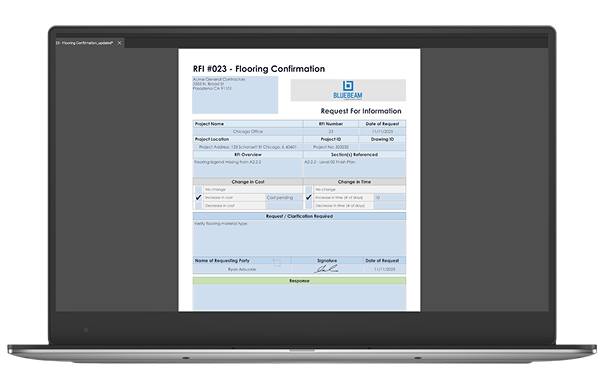
Build a reusable RFI form in Bluebeam Revu.
RFI vs. submittal vs. change order
RFIs, submittals and change orders travel together, but they do different jobs. An RFI asks what the documents mean. A submittal shows how the contractor will meet them. A change order changes them.
| RFI | |
|---|---|
| Purpose | Clarify the contract documents |
| Who initiates it | Usually a subcontractor or the GC<`/td> |
| When it happens | Any time a question comes up, most often during construction |
| Typical outcome | A written answer, sometimes with a sketch or supplemental drawing |
| Submittal | |
|---|---|
| Purpose | Show how the contractor will meet the design: shop drawings, product data, samples |
| Who initiates it | The contractor, often prepared by a sub or supplier |
| When it happens | Before the related work is fabricated or installed, per the submittal schedule |
| Typical outcome | Approved, approved as noted, or revise and resubmit |
| Change order | |
|---|---|
| Purpose | Formally change scope, cost or time |
| Who initiates it | Owner, architect or contractor; signed by all three under AIA A201 |
| When it happens | When an RFI answer, owner request or field condition changes the deal |
| Typical outcome | An adjusted contract sum, schedule or both |
Keep the first and last apart. As specifications writer Kevin O’Beirne wrote in The Construction Specifier, RFI answers “merely clarify what the contract documents already say.” If an answer adds cost or time, AIA A201 requires the contractor to submit a claim rather than simply build it. Bluebeam’s submittal workflow covers the review side.
A punch list item is different again: not a question or a change, but work to finish or fix as the job nears completion. See the guide to punch lists.
What features should construction RFI software have?
Most teams already track RFIs somewhere. The question is whether the log lives in a spreadsheet and an inbox, or in RFI management software that keeps every question tied to the drawing it’s about. Grand View Research sizes the construction and design software market at about $11 billion in 2024, growing more than 10% a year. Here’s what to look for in RFI tracking software:
| Feature | Why it matters |
|---|---|
| Tracking across multiple projects and sites | GCs see every open RFI on every job in one list |
| Mobile and jobsite access | Crews raise RFIs with a photo from the spot where the question came up |
| Approval routing and assignees | Every RFI has an owner and a path to an answer |
| Status and overdue visibility | Late RFIs surface before they hit the critical path |
| Exportable RFI logs (PDF, CSV, XML) | Owners, subs and attorneys get a clean record in the format they need |
| Easy for subcontractors to use | RFIs start with subs; if the tool is hard to learn, they go back to email |
| Integrations with project management platforms | RFIs connect to the systems the rest of the job runs on |
| Pricing and licensing model | Per-user pricing lets small teams license only the people who need it |
How do AI and BIM help reduce RFIs?
The fastest RFI is the one nobody has to write. AI and BIM don’t make field questions disappear, but they move the hunt for conflicts upstream into design review, where a missing tag costs a markup instead of a crew standing by. People still make every call; the software looks first.

Most RFIs trace back to the drawing set: disciplines that don’t agree, tags that are missing, details that were never drawn. Catch those in design review, and fewer questions reach the field. BIM RFI management works the same way, with model coordination and clash detection flagging conflicts before the set is issued.
AI is now bringing that first pass to the 2D drawing sets most crews still build from. McKinsey found 88% of organizations now use AI regularly in at least one business function. Bluebeam Max, the premium AI plan for Bluebeam Revu, puts it to work on RFI prevention:
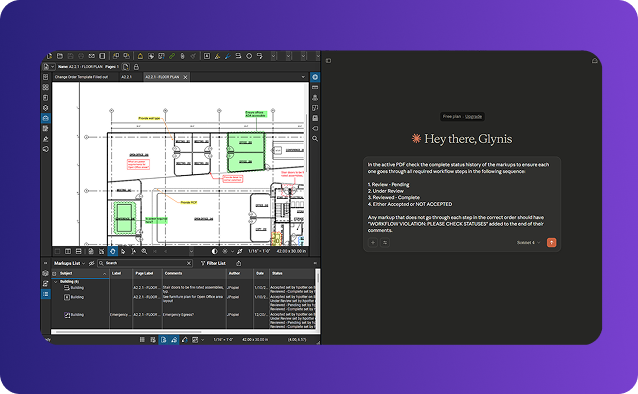
- Smart Review scans the set for design issues such as missing sheets, missing door or plumbing fixture tags and gridline inconsistencies, and shows them as AI-generated markups and trackable issues. Teams resolve them in review instead of fielding them as RFIs later.
- Connected Studio Sessions with Revit link Bluebeam markups to the matching spot in Revit, in both the drawing sheet and the 3D view, so an RFI raised on the PDF ties back to the model.
- Revu + AI tools via MCP let teams use plain-language prompts to find information on drawings, update markups and build custom columns. That’s RFI automation for the log work that used to eat an afternoon in the Markups List.
More than 2,000 teams joined the Bluebeam Max beta before launch. AI doesn’t answer RFIs or make design decisions; the architect or engineer still makes the call. As Steve McElwee, director of construction at Foresight Custom Homes, put it, AI review alongside your own process lets you “move forward with confidence knowing nothing slipped through the cracks.” Learn how Bluebeam uses AI, or read what Bluebeam Max means for builders.
Smart Review and Smart Overlay are currently in preview. Smart Review is optimized for U.S.-based vertical commercial construction.
Catch conflicts before they become RFIs.
How do construction RFI software options compare?
Choosing construction RFI software comes down to where the question lives. Most tools treat an RFI as a record to route. Bluebeam treats it as a markup on the drawing, which is where the question started and where the answer has to end up.
Most teams handle RFIs in one of three ways:
- Email and spreadsheets. Cheap to start and familiar to everyone. Hard to search, easy to lose, and weak as evidence when a dispute starts.
- A module in a project management platform. RFIs live as forms routed inside a larger system. Strong on routing and portfolio reporting, but the drawing is usually an attachment rather than the workspace.
- Drawing-first, in Bluebeam. RFIs are created on the sheet with snapshots and markups, resolved live in Studio Sessions and logged in the Markups List. The question, the markup and the answer stay on the drawing, tied to the revision.
These aren’t either-or. Many GCs run Bluebeam alongside their project management platform, using Bluebeam for markup, review and RFI context and connecting the two through integrations. Bluebeam publishes its per-user plans: $260 to $590 per user per year as of Oct. 13, 2026, with Bluebeam Max at an introductory price.
How to manage RFIs in Bluebeam

Here’s the RFI workflow in Bluebeam Revu, from the question on the sheet to the exported log
- Capture the area in question. Open the sheet in Revu and use Edit > Snapshot to grab the exact region. Add clouds and callouts so the reviewer sees what you’re asking.
- Add it to an RFI form. Paste the snapshot into your RFI form, or build a reusable one with Tools > Form > Automatically Create Form Fields.
- Track status, assignee and due date. Every RFI markup lands in the Markups List, where custom columns let you sort by what’s open, what’s overdue and who owes an answer.
- Apply custom status stamps. Open, Answered and Closed stamps from the Tool Chest make status visible at a glance on every sheet.
- Resolve it live. Start a Studio Session and bring the architect, engineers and subs into the same document at the same time, from the trailer or the office.
- Link the referenced sheets. Batch Link hyperlinks the whole set, so anyone opening the RFI can jump straight to the sheet or detail it references.
- Export the RFI log. When the RFI closes, export the log from the Markups List as a PDF, CSV or XML record for the owner, the subs and the project file.
For a deeper walkthrough, watch the RFIs and Submittals Made Easy webinar, learn to track RFIs in the Markups List or take a course through Bluebeam University.
The bottom line
RFIs come with the job. The average project generates 796 of them, each one costs about $1,080 to answer, and the median reply takes 9.7 days, according to Navigant. The crews and design teams that handle them best ask one clear question, keep it tied to the sheet and answer it together instead of over a two-week email chain.
Site Manager,
Cargill

Bluebeam is rated 4.6 on G2, 4.7 on Capterra and Software Advice, and 8.9 out of 10 on TrustRadius, as of October 2026.
More than 4 million AEC professionals use Bluebeam, and with Bluebeam Max, it’s starting to catch the conflicts behind RFIs before anyone has to ask. See how Bluebeam handles construction RFIs, start a free trial or explore Bluebeam Max.
Frequently asked questions
What’s the best construction RFI software for a small general contractor?
The best construction RFI software for a small GC is the one your team and your subs will use: quick to set up, priced per user and easy for subcontractors who don’t need a full platform license. Bluebeam fits that profile, with published per-user plans starting at $260 a year and RFIs created right on the drawings crews already mark up.
How do the top construction RFI platforms compare on price?
Construction RFI platforms use two main pricing models. Some publish per-user prices, which keep costs predictable and let small teams license only the people who need it. Others price by annual construction volume or by quote. Bluebeam publishes its plans: $260 to $590 per user per year as of Oct. 13, 2026, with Bluebeam Max at an introductory price.
Which construction RFI apps have the best reviews for ease of use?
Bluebeam is among the highest-rated, at 4.7 out of 5 on Capterra and 4.65 on G2 as of October 2026. Because RFIs are created with the same markup tools crews already use on their drawings, most teams need little new training to get started.
Where can I find reliable RFI apps for jobsite crews?
Look for an RFI app that runs on the devices crews already carry. Bluebeam runs on desktop, on the web and on mobile, with apps for iOS and Android, so a foreman can raise an RFI with a photo and markup from the spot where the question came up while the office follows along on the same drawing.
What RFI software is worth the money for subcontractors?
For subcontractors, RFI software pays for itself in documentation. A clear, dated record of every question, answer and impact is what backs up a change order or a delay claim. Look for per-user pricing, so you’re not paying for a full platform, and RFIs tied to the drawing. Bluebeam’s per-user plans and exportable RFI logs cover both.
Who offers RFI software that keeps questions linked to construction drawings?
Bluebeam takes a drawing-first approach: RFIs are created on the sheet with snapshots and markups, and they stay tied to the revision they were raised against, so the answer never lands on the wrong version. The question, the markup and the answer live on the drawing itself, not in an attachment.
Which RFI tools help construction teams get answers faster?
The fastest RFI tools put the person asking and the person answering on the same drawing at the same time. Bluebeam Studio Sessions bring architects, engineers, GCs and subs into one live document, turning a multiday email loop into a single working session. Cargill’s team uses them to turn RFIs around in hours instead of a day or more.
What’s the best RFI tracking software for construction projects?
The best RFI tracking software shows the status, owner and due date of every RFI briefly and produces a clean log on demand. In Bluebeam, every RFI shows up in the Markups List with custom status stamps, filters by discipline, sheet or reviewer, and exportable logs in PDF, CSV or XML.
What’s the best RFI software for construction to manage RFIs and approvals on projects?
Look for RFI software that handles routing, assignees, due dates and an audit trail in one place. Bluebeam routes each RFI to an assignee with a due date and status, records who asked, who answered and when, and keeps the full history tied to the drawing. That gives owners and GCs a defensible record for approvals and closeout.
Which construction RFI software is best for tracking RFIs across multiple sites?
GCs running several jobs need one view of every open RFI. Bluebeam lets teams track outstanding RFIs across multiple projects in a single list, route each one to the right reviewer and export standardized logs for owners and subcontractors. Teams that also run a project management platform can connect the two through Bluebeam’s integrations.
What is an RFI in construction?
An RFI, or request for information, is a formal written question a contractor sends to the design team to clarify drawings, specifications or other contract documents. It records the question, the answer and any cost or schedule impact, so the work proceeds as designed and the project keeps a clear record of every decision.
What is the difference between an RFI and a submittal?
An RFI asks what the contract documents mean; a submittal shows how the contractor plans to meet them, through shop drawings, product data or samples. RFIs come up whenever a question arises in the field. Submittals follow a schedule and get reviewed before the related work is fabricated or installed.
What goes in an RFI log?
An RFI log tracks every RFI on a project: its number and subject, who has the ball in court, its status, the dates sent and due, days open, the sheet and revision it references, and any related submittal or change order. A complete log keeps RFIs from slipping through the cracks and backs up claims later.
How long should an RFI response take?
The contract sets the timeline. Many general conditions spell out a response window, and Navigant’s model contract language suggests 10 working days. As a benchmark, Navigant’s study of more than 1 million RFIs found a median reply time of 9.7 days, with first replies averaging 6.4 days. Critical-path questions should carry an earlier required-by date.
Can AI reduce the number of RFIs on a project?
AI can help reduce RFIs by catching conflicts and gaps in the drawing set before construction starts. Smart Review in Bluebeam Max scans documents for issues like missing sheets, missing tags and gridline inconsistencies, so reviewers can resolve them in design review. The architect or engineer still makes every decision; AI takes the first pass.
How do RFIs relate to punch lists?
They come at different stages. RFIs clarify the documents while the work is being built; a punch list records work that still needs to be finished or corrected as the job nears completion. An unresolved RFI can turn into a punch item if work went ahead on an assumption. See the guide to punch lists.
Table of Contents
- What is an RFI in construction?
- Why do RFIs matter?
- How does the RFI process work?
- Who's involved in an RFI?
- How do you write an RFI that gets answered?
- RFI vs. submittal vs. change order
- What features should construction RFI software have?
- How do AI and BIM help reduce RFIs?
- How do construction RFI software options compare?
- How to manage RFIs in Bluebeam
- The bottom line
- Frequently asked questions

