


ZGF Architects
PDX Reimagined: How a Digital Backbone Powered America’s Most Ambitious Airport Project
A new way to supercharge Revu with AI.

The Complete Guide to Construction Takeoffs in 2026


Bluebeam on Mac
Bluebeam it on a Mac
See exactly how to use Bluebeam on your Mac today, and what’s coming next on web and mobile for Mac users.
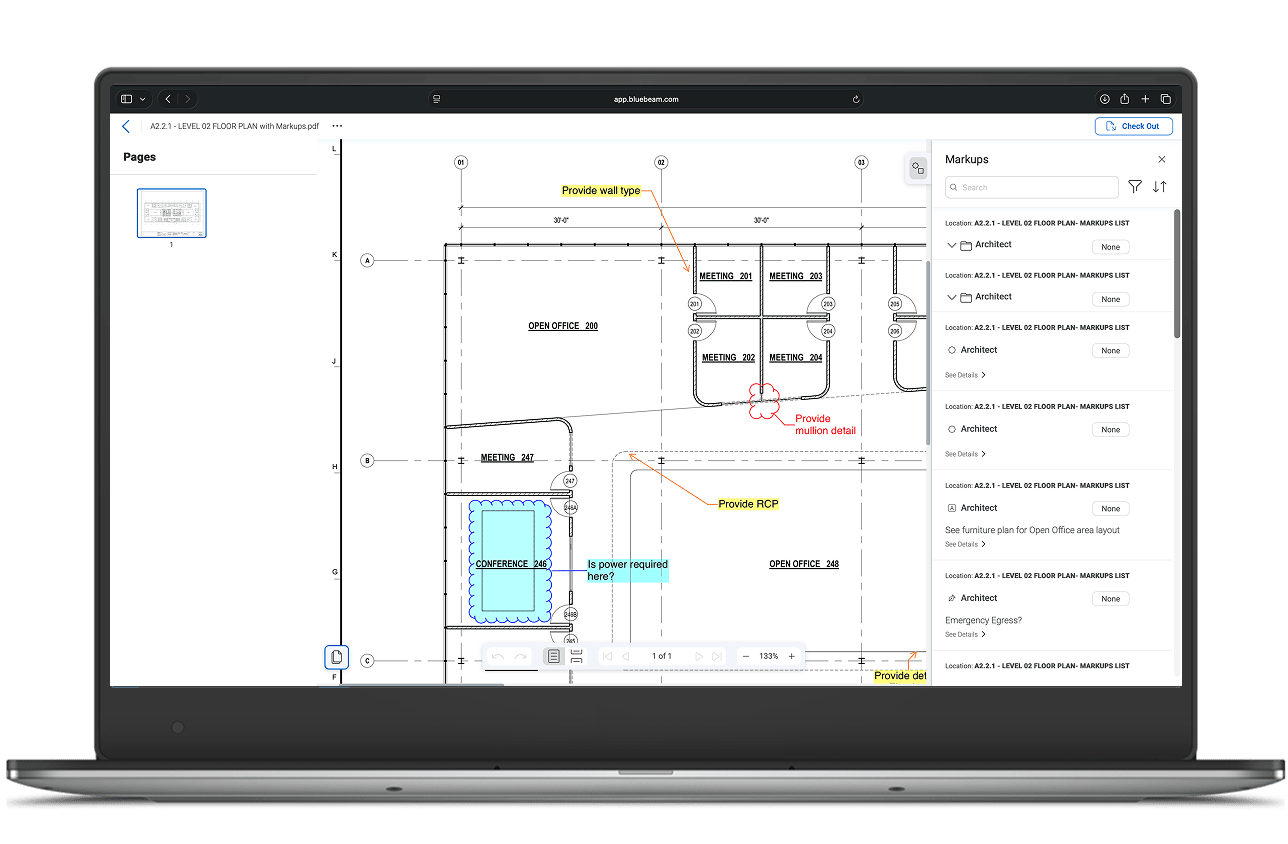
One experience across your Apple devices
Work in Bluebeam on Mac and iOS in the way that fits your work best, whether in a browser, on an iOS device, or with full Revu via virtual windows machine.
- Review and markup plans with the same tools and context
- Keep drawings, comments, and measurements synced through Studio Projects and Sessions
- Move between browser, iOS, and full Revu via a virtual windows machine without losing your place
- Bring Mac users fully into the Bluebeam workflows their project teams already rely on

Three ways to Bluebeam it on Mac
- iOS
- Web Browser
- Virtualization
Bluebeam it on iOS
The Bluebeam app on iOS lets you join Studio Projects and Sessions to collaborate, view drawings, place markups, and manage files from iPhone or iPad. On Apple Silicon Macs that support iOS apps from the App Store, you can install the Bluebeam app and use the same experience on your Mac as well.
- Walk jobsites with an iPad or iPhone and capture markups in the field
- Review and respond to drawings away from your desk, then hand off to desktop or web
- Use touch interface for quick review and coordination

How to get started:
- Open the App Store and search for “Bluebeam”.
- Install the Bluebeam app and sign in with your BBID.
- Open Studio Projects or Sessions, or open local PDFs from your device or Files.
Bluebeam it from your browser
Bluebeam on the web runs in your browser, so you can log in from a Mac and start working without installing anything.
Access Studio Projects and Sessions, open PDFs, place markups, take measurements, and manage documents in one place.
- Review and markup drawings from a Mac without switching machines
- Join Studio Sessions for real-time collaboration with project teams
- Keep working consistently whether you’re on Mac at home or Windows in the office

How to get started:
- Open a supported browser on your Mac and go to app.bluebeam.com.
- Sign in with your Bluebeam ID (BBID).
- Open a Studio Project or Session, create a new PDF, or upload a local PDF to start marking up.
Bluebeam it via a virtual machine
If you rely on the full Revu desktop feature set, you can run it on a Mac by installing Revu on a virtual Windows machine.
Tools like Parallels Desktop let you set up Windows 11 on Apple Silicon or Intel Macs and run Revu much like you would on a dedicated Windows PC. Your IT team may already have a preferred virtualization solution or standard image to use.
- Use the full Revu desktop toolset and advanced workflows
- Stay aligned with a Windows‑standardized Revu environment across your company
- Keep your Mac hardware while still getting a full Windows desktop experience
- Available as a native arm64 application, Revu runs especially smoothly on Apple Silicon Macs via the ARM version of Windows 11.

How to get started:
- Install Parallels Desktop (or another supported virtualization tool) on your Mac.
- Set up Windows 11 in a new virtual machine.
- Download and install Bluebeam Revu for Windows inside that Windows environment.
Get your work done with Bluebeam
Match your workflow to the option that fits best.
- Access drawings from any Mac browser
- Add markups and comments quickly
- Join Studio Sessions without switching devices
- Capture RFIs and submittal markups in the field on iPhone or iPad
- Add notes and photos directly on your drawings while in the field
- Stay connected to the latest project documents
- Capture items that need to be addressed on iPad/iPhone in the field
- Attach photos and markups on the spot
- Keep history log of comments connected to current drawings
- View centralized drawings and documents from browser
- Track markups and status in Studio
- Send Studio documents out for signatures with DocuSign
- Set markups to drawing scale
- Create custom markups
- Have AI do preliminary sketches for you with Revu Connected to AI
- Use full Revu measurement and takeoff tools on your Mac desktop
- Achieve maximum precision and control for preliminary estimates
- Apply existing Revu standards and templates
Bluebeam on web
- Access drawings from any Mac browser
- Add markups and comments quickly
- Join Studio Sessions without switching devices
Bluebeam on iOS
- Capture RFIs and submittal markups in the field on iPhone or iPad
- Add notes and photos directly on your drawings while in the field
- Stay connected to the latest project documents
Bluebeam on iOS
- Capture items that need to be addressed on iPad/iPhone in the field
- Attach photos and markups on the spot
- Keep history log of comments connected to current drawings
Bluebeam on web + virtual machine
- View centralized drawings and documents from browser
- Track markups and status in Studio
- Send Studio documents out for signatures with DocuSign
Virtual machine
- Set markups to drawing scale
- Create custom markups
- Have AI do preliminary sketches for you with Revu Connected to AI
Virtual machine
- Use full Revu measurement and takeoff tools on your Mac desktop
- Achieve maximum precision and control for preliminary estimates
- Apply existing Revu standards and templates
Our roadmap for web and mobile
Bluebeam is focused on bringing more of Revu’s power to web and mobile so you can work from any Apple device, including Macs. That means richer markups, stronger measurement tools, better document control, Tool Set syncing with Revu, and deeper integrations with the design and construction software you already use.
