|
PDF Markup
- Bluebeam exclusive! Create and save your most commonly used markups in the Tool Chest
- Add lines, shapes, arcs, curves, clouds, symbols and images to PDFs
- Fill shapes with hatches and create custom hatch patterns
- Easily customize your markup by selecting color, font, line thickness and more
- Create sequencing markups that auto-increment each time they are placed on a PDF
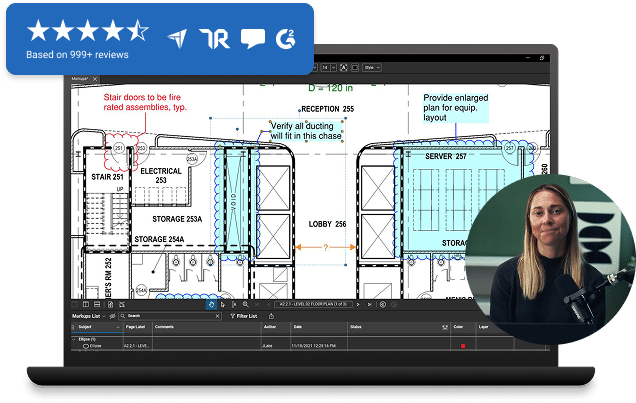
- Manage markups in a convenient list that can be filtered, searched, imported and exported
- Add custom columns to the markup list and add information you need for each markup
- Dim the background to view PDF markups easier
|
File Access
- Easily preview or open recent files with a mouse click from the File Access tab
- Pin and organize commonly used files by folder, or group by category
- Open, markup and save project documents from ProjectWise and SharePoint with direct integration from Revu's interface
|
Drawing and Document Review
- Automatically highlight the differences between two PDF drawings with Compare Documents
- Overlay PDF pages with different colors to easily see the changes
- Proofread documents with Advanced Text tools that quickly and easily edit, underline, highlight or strikethrough text in PDF files
|
One-Button Creation
After installation, Bluebeam will integrate into your MS Office, AutoCAD, Revit and SolidWorks programs and install buttons at the top of your interface. The first button converts your active Office document, SolidWorks file or DWG to PDF from your interface. Bluebeam PDF Revu will launch your PDF and allow for markup and editing.
|
PDF Forms
- Fill in PDF forms - add text, select radio buttons, check boxes, lists and click buttons
- Highlight form fields and required fields in a PDF document
|
Online Search
Bluebeam's exclusive new Webtab™ integrates a full web browser giving you direct access to the web within Revu. Search online for PDF brochures, online PDF catalogs and other documents and view them in Revu. Copy, paste and assemble the PDF documents to produce a new PDF file, ready for distribution.
|
Batch Processing
Batch processing capabilities in Revu allow you to select an unlimited number of files to:
- Create PDFs
- Apply stamps and security
- Compare Documents
- Print documents
- Flatten markups
- Rotate and Crop pages
- Reduce file size
|
|
|
PDF Navigation
- PDF filenames are displayed in tabs so you can easily switch between open PDF files
- View multiple PDFs at once (up to 16!) and zoom and pan in unison with Bluebeam's exclusive MultiView™ and Sync™ technologies
- Easily pan, zoom and scroll with a standard mouse or navigate while adding markups with 3D mouse compatibility
- View PDF files in Internet Explorer, search for keywords, take a snapshot and save files locally
|
PDF Editing
- Add and delete text, change fonts, size and layout
- Insert, reorder, delete and copy pages in a PDF file
- Permanently delete text and images with PDF redaction
- Add customized headers and footers with dates, page numbers and Bates stamps
- Replace and rotate pages in a PDF file
- Integrated spell check that marks spelling errors in comments, form fields and PDF content
- Change the colors in a PDF or change from color to grayscale with color processing
|
Takeoffs and Measurements
- Get digital takeoffs from a PDF drawing with a built-in Measurements tool
- Measure length, area, volume, perimeter, radius and angles and count from PDF drawings
- Automatically save takeoffs in the Markups list to summarize and export to Excel
- Create custom columns in the Markups list and apply formulas to calculate costs
|
Advanced Markup and Editing
- Add digital signatures, certify documents and validate signatures in Revu
- Add file attachments to PDFs that open by double clicking an icon in the document
- Add flags and bookmarks to PDF files and easily reorder bookmarks with drag and drop functionality
- Add links to markups that open websites, local files or jump to a page in the PDF
|
PDF Creation
- Scan to PDF functionality for scanners and digital cameras
- Create PDF Packages for project files or proposals
- Create compressed PDFs with file reduction options
- Combine PDF files into a single PDF
- Create and save PDF templates
|
Tablet PC
Bluebeam includes features specifically desgined for Tablet OS users who are looking for a quick and easy way to review and annotate PDF files with the ease of their Tablet PC pen.
|
|
|
|
What's new in 8
File Access
The File Access tab tracks recently opened PDF files in a list, displays a preview, and reopens the file with a mouse click. Pin and organize commonly used files by folder, sort by date or file name or group by category. Search local or remote files from the Revu interface and reopen all files from a previous session with one button.
SharePoint & ProjectWise integration
Direct integration with SharePoint & ProjectWise makes it simple to access files in a shared library. Open files, add markups and edits, then check them back in without leaving the Revu interface. Each user can control the level of integration that best fits their workflow.
Revit plug-in
Revu 8 integrates with Revit 2010 for one-button PDF creation from Revit. Select sheets to include in the PDF and reorder the sheets before creating the PDF.
Customizable toolbars
Control which toolbar icons are displayed within Revu’s interface, or create a custom toolbar that includes any combination of icons you prefer.
Custom Columns in Markups list
Create custom columns in the Markups list that include formulas for calculations, drop down menus, check boxes, dates, or text.
Overlay Pages
Visually compare two different PDF drawings by converting each drawing to a different colored layer and then overlaying the drawings so you can easily view the differences.
Markup actions
Add hyperlink properties to markups. Revu 8 allows you to add an action to a markup that links to a page, a zoomed area of the PDF, hyperlinks to a website or opens a file.
Markup sequencing
Markups that include a text box with a number or letter can be set to automatically increment in value when added to the PDF.
Color Processing
Change colors in the PDF content by selecting an original color and changing it to a new color. Color processing also changes colored PDFs to monochrome or grayscale.
Internet Explorer plug-in (beta)
View PDF files in IE, complete forms online, search for keywords, take a snapshot, copy text, save files locally, and click a button to open the PDF in a local session of Revu.
Radius measurements
Measurements tool includes the ability to calculate a radius measurement.
Tool Chest additions
Markups that are saved in the Tool chest can be duplicated and changed to any color.
Paste functionality
Copy an item from one page and paste it into the same location on a different page. You can also apply a paste function to specific pages in a document using the thumbnails tab.
Hide Markups
From the Markups list, all markups can be hidden from the PDF using the Hide Markups button.
Alignment modes
When aligning markups on a PDF, Revu 8 offers additional options to align by width, height and size as well as distribute horizontally and vertically.
Snapshot enhancements
Change the color of PDF Snapshots and copy an entire page as a Snapshot using the Thumbnail panel.
More Search Options
Revu 8 adds the option to search within the filename and to search file properties.
3D mouse support
Revu 8 is compatible with the Connextion 3D mouse so users can navigate the PDF and apply markups at the same time.
Highlight mode
Any markup that has a fill color or hatch pattern can be given a highlight effect by selecting the option in the properties panel.
|
|
|