ZGF Architects
PDX Reimagined: How a Digital Backbone Powered America’s Most Ambitious Airport Project
A new way to supercharge Revu with AI.
The Complete Guide to Construction Takeoffs in 2026
Run construction design reviews faster by standardizing QA/QC checklists, capturing every decision in one place and using AI to quickly surface potential design issues.

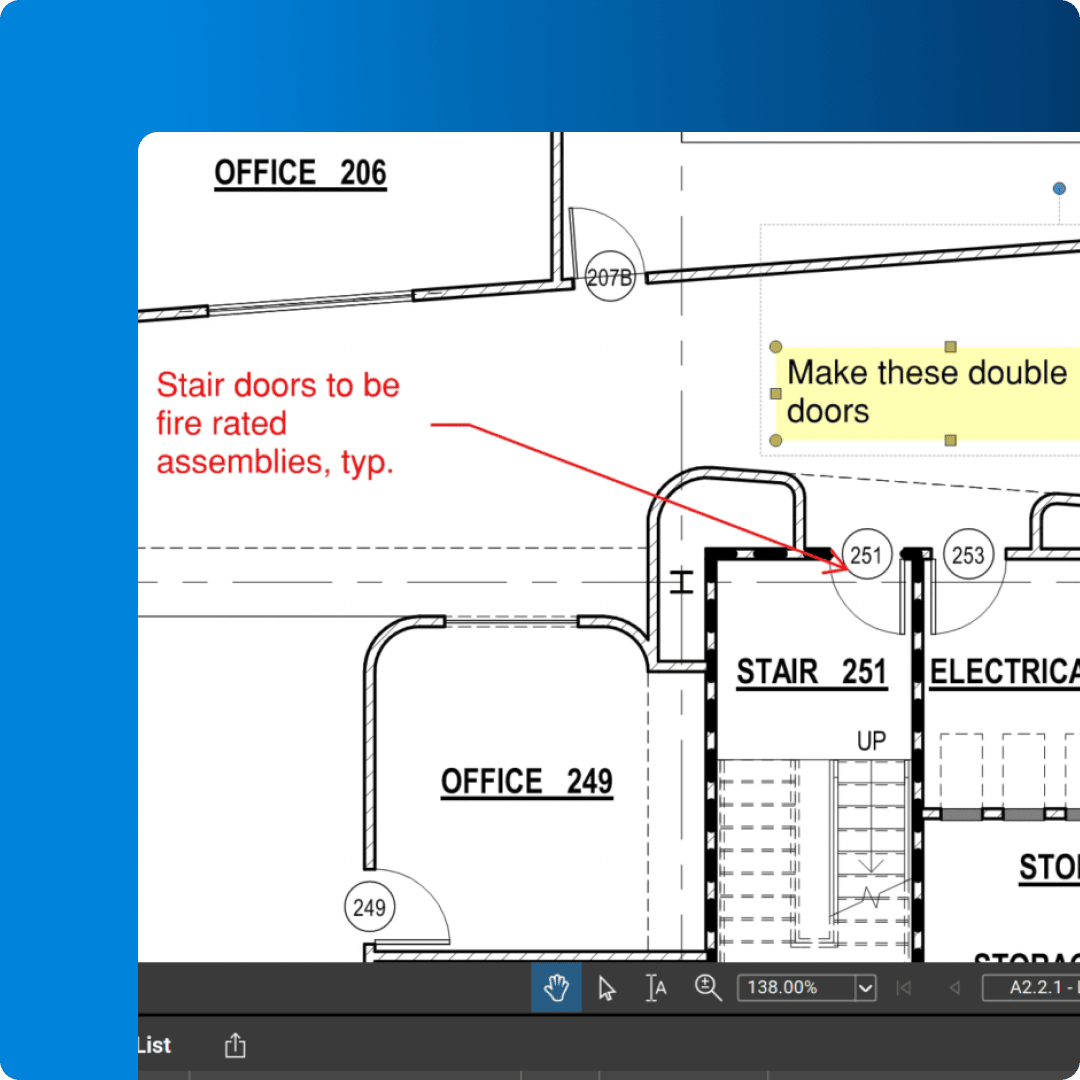


Run architectural design reviews that keep client feedback, internal comments and approvals organized on every set.
Capture markups, sketches and design options directly on drawings during review
Standardize review stamps, colors and symbols to match your office standards
Track comment status and approvals so nothing gets lost between design iterations

“It’s taken a stunning amount of time out of our QA/QC process.”
Matt Forman
CannonDesign





Bluebeam makes complex, multi‑discipline construction design reviews easier to coordinate and control, helping teams catch issues earlier and deliver higher‑quality work.

Clarity: Capture every comment, sketch and decision directly on design drawings so feedback is easy to see, understand and act on.
Consistency: Standardize stamps, symbols and QA/QC checklists so every discipline follows the same review process and quality standards.
Collaboration: Run real-time or asynchronous design reviews in shared Sessions so teams can coordinate changes without passing files around.
Control: Track statuses, responsibilities and due dates in the Markups List and export review summaries so nothing slips through the cracks.
Insight: Use AI to quickly surface patterns and potential design issues in markup and project documentation so reviewers can focus on the highest‑impact decisions.
CannonDesign cut 2–3 weeks from each major hospital design review by moving QA/QC and user reviews from paper to digital workflows in Bluebeam.
DPR Construction reduced a typical 25–30 day submittal review cycle by over 33% using Bluebeam for enable real‑time, multi‑party reviews.
Global engineering firm Arup cut design review times by as much as 60% while maintaining quality across complex, multi‑discipline projects.

Bluebeam Revu simplifies quality control and review processes by providing powerful tools for digital collaboration, markups, and document management.
Accelerate design reviews
Review the latest updates digitally, ensuring that errors are caught early. And reduce time spent on reviews and approvals with secure, real-time collaboration.
Improve constructability reviews
Identify potential construction issues before work begins, reducing costly rework. Track all edits and comments and get the latest updates on any device.
Enhance QA/QC accuracy
Ensure quick, accurate QA/QC reviews with customizable toolsets, standardized checklists, and clear project communication from start to finish.
Simplify punch and RFIs
Easily create, track, and resolve punch list items and RFIs (Request for Information) in real time anywhere from your web or mobile device.
Bluebeam offers comprehensive tools for accelerating reviews and enhancing QC accuracy. Here’s how to get started.
Studio is Bluebeam’s real-time collaboration environment. To create a Studio Session, navigate to the Studio tab, select “Add > New Session.” Then name the session, add PDFs, set collaborator permissions, and click “OK” to create and upload files.
You can invite teammates and stakeholders to participate in a Studio Session — even if they don’t have Bluebeam. Go to your Session or Project, select “Invite.” Then type or paste their emails. You can customize messages, individual permissions, and more.
Studio Sessions allows collaborators to add markups to the same PDF document together in real time. All markup activity is tracked in the Record that conveniently links back to the Session PDFs, and a built-in chat feature aids communication.

Effortlessly communicate project data with highly customizable, in-depth annotations.

Invite anyone in the office or the field to digitally mark up and measure together at the same time.

Save custom markups and measurements for easy reuse and share them with teammates to improve communication.

Track all markups in an integrated, customizable list for improved accountability and easily create PDF, CSV or XML reports.

Create 2D and 3D PDFs directly from Revit®, AutoCAD®, Navisworks® Manage, Navisworks Simulate, SketchUp® Pro and U3D, PRC or IFC files.

Keep sets up to date by automatically matching new revisions with their corresponding current sheets.

Compare two or more PDFs by converting each to a different color then stacking them on top of each other as layers.

Compare two PDFs and highlight the differences with markups that can be easily reviewed.

Use AI to scan drawings for design issues, scope gaps and discrepancies in one pass.

Use AI-assisted overlays to compare plan sets and highlight meaningful design changes faster.

Link Sessions to Revit so PDF markups appear in the right sheet and 3D model views.
Integrations
Whether you’re using one of our ready-to-use integrations or building your own with Bluebeam Studio APIs, you can connect the applications you rely on for smoother workflows that keep projects moving.

Resources