


ZGF Architects
PDX Reimagined: How a Digital Backbone Powered America’s Most Ambitious Airport Project

A new way to supercharge Revu with AI.

The Complete Guide to Construction Takeoffs in 2026


The Complete Guide to Construction Estimating Software in 2026

Before a single nail gets driven, someone has to answer a hard question: What is this project going to cost?
That question doesn’t get answered with gut feel, but data — quantities pulled from drawings, costs applied to those quantities, and a bid number that a contractor can stand behind when they put it in front of an owner.
Construction estimating software is the system that makes that possible. It turns drawings into numbers, numbers into bids, and bids into work.
This guide breaks down everything you need to know: what the software does, how it works, what separates one type from another, and how to choose the right solution for your workflow. Whether you’re a small specialty sub trying to get faster or a commercial general contractor managing dozens of simultaneous bids, the fundamentals are the same. The stakes are high. The margin for error is thin. And the right tools make an enormous difference.
What is construction estimating software?

The distinction that matters most: estimating is not accounting. Accounting tracks what was spent. Estimating predicts what will be spent, based on design intent and construction knowledge. That predictive function is what the software is built to support.
Who uses it: general contractors, specialty subcontractors, civil contractors, design-build firms, and independent estimators. Anyone who has to put a number on a project before the work begins.
Why it matters: most contractors operate on net margins in the low single digits. A missed room, an unmeasured run of conduit, a slab thickness assumed instead of verified — individually those sound minor. In aggregate, they’re how projects lose money. Construction estimating software is the system that keeps those errors from compounding.
How construction estimating software works
The software isn’t magic. It’s a multi-stage data transformation process — one that converts design intent into a financial obligation. Here’s how that process unfolds.
Step 1: Import Plans and Drawings
The workflow starts with documents. PDF drawings, CAD files, or BIM models are imported into the platform. From there, the estimator’s job is to turn geometry into numbers.
Modern estimating tools treat the drawing as more than a static image. Measurements made on-screen become both a visible markup on the drawing and a structured data record. That dual nature — visual and numerical at the same time — is what separates digital estimating from manual workflows. You can see what’s been counted, how it was measured, and where it lives in the overall scope.
Step 2: Perform Digital Takeoffs
Before any costs can be applied, quantities have to be established. This is the takeoff — the process of measuring and documenting everything the drawings show that needs to be built.
Lengths. Areas. Volumes. Counts. The takeoff answers one question: what does the project require, in measurable terms?
It’s worth being precise here, because these terms get blurred in practice. A quantity takeoff (QTO) captures net, in-place quantities directly from the drawings. A material takeoff (MTO) builds on that by converting net quantities into what needs to be purchased — accounting for waste, packaging, and constructability. The cost estimate is where those quantities meet money.
Keeping those layers distinct matters. It makes estimates easier to review, revise when drawings change, and explain to project teams after the job is awarded. And no amount of pricing accuracy can fix bad quantities. The takeoff is the independent variable. Everything else depends on it.
For a deeper look at how takeoffs work before costs enter the picture, see Construction Takeoffs: The Complete Guide to Quantity & Material Takeoffs in 2026.
Step 3: Apply Costs Through Databases and Assemblies
Once quantities are established, the software applies pricing. This is where cost databases and assemblies do their work.
A cost database is a repository of unit prices — material costs, labor rates, equipment costs — that the software uses to price out individual line items. High-tier platforms integrate with third-party data sources like RSMeans or Craftsman, giving estimators localized, current pricing that updates as markets shift.
An assembly is the estimating equivalent of a macro. Instead of pricing every sub-component of a task individually, an assembly groups them together. A “3,000 PSI Concrete Slab” assembly might include concrete, rebar, vapor barrier, formwork, and labor hours for placing and finishing — all triggered by a single area measurement. Apply the assembly to a square footage takeoff, and the platform populates every sub-item automatically.
The underlying logic: every line item cost flows from a formula that accounts for the raw quantity from the drawing, a waste factor, a material unit cost, a labor hour per unit, a labor rate, and an equipment cost per unit. When a design change occurs and a wall gets longer in the takeoff, the software recalculates material needs, labor hours, and equipment requirements automatically. No manual re-entry. No arithmetic errors.
Step 4: Manage Subcontractor Bids
For scopes not self-performed, estimating platforms manage the solicitation and leveling of subcontractor quotes. Bid leveling — comparing sub bids side by side to identify scope gaps, duplications, and outliers — is one of the most risk-reducing functions in the software. It’s also one of the most underused by teams still doing this work in spreadsheets.
Step 5: Apply Indirect Costs and Build the Final Number
Taxes, insurance, overhead, and profit margins are layered in. Most platforms automate these calculations through rules-based engines that apply corporate financial standards consistently. Indirect costs are the layer where institutional knowledge lives — what the firm has learned about what projects cost to deliver, not just what the drawings show.
Step 6: Validate Against Historical Benchmarks
Before a bid goes out the door, the best platforms allow estimators to compare the current estimate against the firm’s historical project data — cost per square foot, unit counts, productivity rates. This benchmarking step is where data-driven estimating earns its keep. It turns institutional experience into a quality control mechanism.
Step 7: Generate the Proposal
The software produces the bid document — often including exclusions, qualifications, and alternate pricing scenarios. That document is the firm’s financial commitment. Everything upstream is in service of getting that number right.
Key features of construction estimating software
Not all platforms are built the same. The features that separate functional tools from genuinely valuable ones are the ones that reduce manual intervention, surface errors before they become expensive, and keep data connected across the entire preconstruction process.
Digital takeoffs
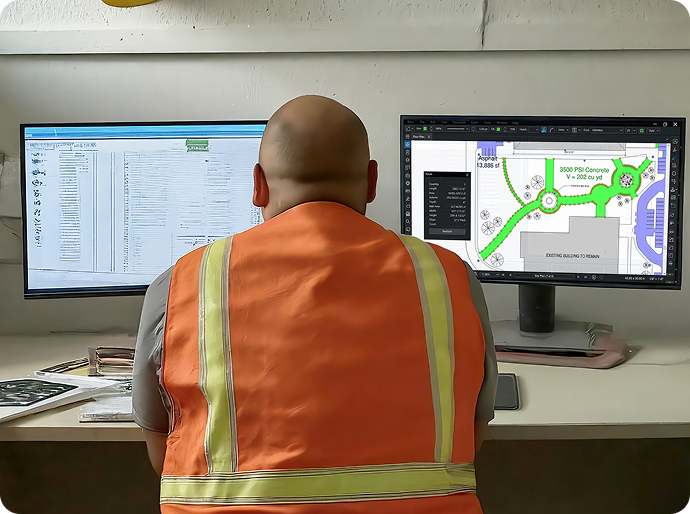
The foundation. Estimators need to measure lengths, areas, volumes, and counts directly from drawings, with results that are visible on the drawing and traceable in the data. If a quantity only lives in a table, review becomes trust-based instead of evidence-based. Bluebeam’s takeoff tools tie every measurement to both a visual markup and a structured data record — making takeoffs auditable by design.
Cost databases
Construction material and labor costs shift constantly — and manual spreadsheets can’t keep pace. Software with live-linked cost data means bids reflect current market conditions, not last cycle’s prices.
Assemblies and templates
Pre-built assemblies for common tasks and project-type templates that pre-load the work breakdown structure, standard exclusions, and typical line items — these capabilities let estimators start from a solid foundation instead of a blank sheet on every bid.
Cloud collaboration
Historically, a chief estimator would merge individual spreadsheets from multiple team members — a process prone to data loss and version chaos. In cloud environments, the team works in a shared database where changes are reflected instantly. Last-minute subcontractor quotes can be entered and analyzed in real time, with the total project margin updating in seconds.
Integrations
Accounting and ERP integration allows the estimate to become the initial job budget without manual re-entry. Project management integration enables clean handoffs from preconstruction to operations. Field teams track costs against the same line items the estimator used — which is how the firm learns whether its estimates are accurate.
Mobile access
When a field superintendent can perform a quick takeoff on a tablet and generate a cost for a design change on-site, the firm can secure owner approval faster and avoid schedule delays
Reporting and bid management
Dashboards that track bid volume, win rates, and project-type performance. Firms that track their bid-hit ratio by project type often discover they’re spending enormous resources chasing work they rarely win — and underinvesting in categories where they dominate.
Types of construction estimating software

The market isn’t monolithic. Different platforms are built for different workflows, project types, and levels of estimating complexity. Understanding the categories is the first step to choosing the right one.
Takeoff-driven estimating tools
Built around the visualization and measurement of drawings. Often Excel-friendly — estimators measure in the tool and feed quantities into a spreadsheet or downstream estimating system. Intuitive, fast for drawing-based workflows, and strong on accuracy and reviewability. The limitation: they don’t typically include a robust backend for labor tracking, cost databases, or bid leveling. Many firms use them in combination with dedicated estimating platforms — Bluebeam handles scope definition and quantity validation, while downstream tools handle pricing and assemblies.
Cost database-driven platforms
Enterprise-grade systems built around massive pricing libraries and labor unit databases. They excel at multi-user coordination on complex projects and standardizing estimating across large teams. The tradeoff: high implementation overhead and a learning curve that demands organizational commitment.
All-in-one preconstruction suites
Platforms that handle takeoff, estimating, bid solicitation, and project management in a single environment. The appeal is a single source of truth and the highest data continuity. The risk: generalism. These platforms can be less precise than specialized tools for complex trade work.
Trade-specific estimating tools
Built for MEP, concrete, steel, or other specialty trades. Pre-loaded with relevant labor units and code-compliant assemblies, aligned with association standards (NECA, MCAA). Deep precision for their specific domain. Limited flexibility for contractors who work across multiple trade divisions.
Cloud-based vs. desktop solutions
Cloud deployment held roughly 68.7% of market revenue in 2024 and continues to gain share, driven by the need for remote collaboration, instant scalability, and automatic database updates (Mordor Intelligence). Desktop tools persist in public-sector and defense environments where local data sovereignty requirements make cloud deployment impractical, but they’re increasingly viewed as legacy infrastructure for most commercial applications.
What’s the best construction estimating software?
The best construction estimating software depends on your workflow, project type, and team.
That’s not a dodge. It’s the right answer, because “best” means something different depending on what you’re building and how you build it. A five-person electrical sub and a 500-person commercial GC have fundamentally different needs; a platform optimized for one is often wrong for the other.
That said, “best” can be defined by criteria that apply across the board.

- Accuracy. The baseline. The software needs to produce quantities that reflect what the drawings show — calibrated correctly, organized clearly, and reviewable by a second set of eyes. If you can’t trace a number back to a specific location on a specific sheet, you don’t have accuracy. You have faith.
- Speed. Estimating is a competitive activity. Bid timelines are fixed. The faster a team can go from drawings received to numbers ready for pricing, the more opportunities it can pursue — and the more time it has to get the numbers right.
- Collaboration. No longer optional. Estimating is a team sport, and platforms that don’t support real-time concurrent work are creating friction that costs firms money on every bid.
- Flexibility. What keeps experienced estimators from reverting to Excel. The best platforms provide database-backed structure without removing the judgment and custom logic that veteran estimators have spent careers developing.
Integration capabilities. A bid that has to be manually re-entered into accounting, project management, and scheduling systems is a bid that will introduce errors. The estimate should flow downstream, not get retyped.
Bluebeam was recognized as the highest-rated solution on Capterra’s 2025 Best Construction Estimating Software report, earning a 4.7 out of 5 stars from more than 966 verified users — a reflection of the real-world value teams experience across accuracy, unified workflow, and collaboration.
How to choose construction estimating software
Selecting an estimating platform is a significant commitment. The wrong choice doesn’t just cost money — it costs time, adoption energy, and the opportunity cost of a workflow that never fully delivers. Here’s a decision framework built around the questions that matter.
Step 1: Define your workflow
Start with how your team estimates, not how you wish they did.
Is your workflow takeoff-first — driven by measuring drawings, establishing quantities, and feeding those numbers into a pricing system? Or is it cost database-driven — working from assemblies and historical labor units with quantities as inputs? Most specialty subcontractors are takeoff-first. Large commercial GCs often operate cost database-driven workflows. Many firms use both, in sequence.
Identifying where your workflow starts tells you what the software’s core function needs to be.
Step 2: Match to project type
Residential estimating prioritizes speed and client-facing proposal quality. Projects are typically less complex, but revision frequency is high and schedules are fast. Software that handles frequent design changes and generates professional quotes quickly is more valuable than enterprise-grade bid management.
Commercial estimating requires detailed work breakdown structures, compliance with CSI MasterFormat, and the ability to manage high volumes of subcontractor bids simultaneously. Multi-user collaboration and bid leveling capabilities aren’t nice-to-haves; they’re requirements.
Industrial and infrastructure work focuses on unit price contracting. Software needs to handle massive quantities — tons of steel, cubic yards of earthwork, miles of conduit — and calculate productivity rates for heavy equipment.
Specialty subcontractors need platforms that understand the standards of their trade. Electrical estimating built around NECA labor units. Mechanical estimating aligned with MCAA WebLEM. Generic platforms often fall short here.
Step 3: Evaluate capabilities against requirements
Don’t evaluate features in isolation. Evaluate them against the specific ways your team loses money or time.
If your biggest pain point is revision chaos — addenda coming in late, estimators rebuilding takeoffs from scratch every time drawings change — prioritize platforms with strong document comparison, visual overlay tools, and organized quantity structures that make revisions into adjustments rather than rebuilds.
If your biggest pain point is consistency — five estimators, five methods, five different waste factors — prioritize standardization features. Shared tool sets, locked naming conventions, template-based workflows that capture institutional knowledge and make it repeatable regardless of who’s measuring.
If your biggest pain point is speed — you’re losing bids because you can’t turn estimates around fast enough — prioritize automation. Visual search tools, AI-assisted symbol detection, assembly-based pricing that collapses hours of manual entry into minutes.
If your biggest pain point is the handoff — estimates that get made and then remade for accounting, project management, and the field — prioritize integration. The estimate should flow downstream, not get retyped at every transition.
Step 4: Consider scalability and total cost
The sticker price of software is rarely the real cost. Factor in implementation time, data migration, training, and the productivity dip that accompanies any major workflow change. A realistic implementation runs three to six months: a pilot project to refine workflows, a data normalization phase to import historical costs and labor units, formal team onboarding, and integration mapping with accounting and project management systems.
The firms that fail to realize software ROI usually make one of a few predictable mistakes: they treat the platform as a calculator and never build out the database, so estimators keep entering prices manually. Or the software is too rigid, and experienced estimators revert to spreadsheets. Or the field team never gets brought into the workflow, and a data silo forms at the estimating-to-execution handoff.
The question to ask before signing: does this platform work the way our best estimators think, or does it force them to think differently?
Construction estimating software comparison
Different software categories serve different needs. No single category is right for every firm. The table below maps categories to use cases honestly — strengths and limitations both.
| Software Type | Best For | Strengths | Limitations |
|---|---|---|---|
| Takeoff-driven | Drawing-based workflows, specialty trades | High accuracy, visual verification, strong revision handling | Requires downstream cost system for full estimating |
| Cost database-driven | Enterprise GCs, repeat project types | Powerful standardization, historical benchmarking, labor unit precision | High implementation burden, requires dedicated data management |
| All-in-one preconstruction | End-to-end workflows, single source of truth | Data continuity from estimate to project | Less specialized for complex trade work |
| Trade-specific | MEP, concrete, steel, civil | MEP, concrete, steel, civil | Limited flexibility across multiple trade divisions |
| Cloud-based | Distributed teams, multi-user bid cycles | Real-time collaboration, automatic updates, scalability | Data sovereignty limitations for some public-sector work |
| Desktop | Regulated or secure environments | Local data control | Limited collaboration, increasingly legacy |
Best construction estimating software by use case
Small contractors — under 10 employees — need software that delivers immediate value without a six-month implementation. The priorities are affordability, fast setup, an intuitive interface, and basic quoting capability that produces professional proposals.
What matters most: integrated takeoff tools that don’t require a separate system, Excel export that works with existing spreadsheets, and a learning curve that doesn’t require a dedicated trainer. Many small contractors find that a takeoff-first platform handles 90% of their estimating needs, with Excel or a simple pricing template handling the rest.
What to avoid: enterprise platforms with extensive configuration requirements and licensing costs built for firms that bid at 10 times the volume.
Small contractors
Commercial GCs face a different set of problems. They’re managing multiple simultaneous bid packages, coordinating estimating across a team, leveling dozens of sub bids on bid day, and handing off to a project team that needs the estimate to become the budget without manual re-entry.
The critical capabilities: multi-user collaboration in a shared environment, bid leveling matrix tools, historical benchmarking against past project actuals, and accounting integration that makes the estimate the job budget automatically. Cloud-based platforms built for team-based estimating are the standard here.
Commercial construction
Specialty subcontractors live and die by their takeoff accuracy and their labor productivity assumptions. An electrical sub estimating a hospital wing has hundreds of devices, miles of conduit, and labor hour calculations that need to reflect real installation conditions — not generic rates.
Trade-specific platforms built around NECA labor units for electrical, MCAA WebLEM for mechanical, or specialized concrete and steel tools give specialty contractors the domain precision they need. Many also use Bluebeam for the takeoff layer — measuring from drawings with trade-specific custom tool sets before feeding quantities into their pricing system.
The standardization payoff is real. See how Cummings Electrical went fully digital with its estimating workflow and eliminated paper entirely.
Subcontractors
Cloud-based estimating matters most for distributed teams — multiple estimators in different locations contributing to a single bid, or firms that operate across multiple offices and need consistent standards enforced without a centralized IT function.
The characteristics that define a strong cloud-based estimating solution: real-time concurrent editing in a shared database, automatic cost database updates, mobile access for field-based change order management, and access controls that allow appropriate permissions across different team roles.
Best cloud-based estimating software
Bid management is about more than winning a single job. It’s about understanding which jobs you should be chasing. The best platforms include dashboards that track bid volume, win rates, and performance by project type and owner — the bid-hit ratio data that tells a firm where it’s competitive and where it’s spending resources on work it’s unlikely to win.
Version control, real-time sub bid tracking, exclusions management, and professional proposal generation round out the capability set for firms where the bid itself is a competitive differentiator.
Bid management
Bid management is about more than winning a single job. It’s about understanding which jobs you should be chasing. The best platforms include dashboards that track bid volume, win rates, and performance by project type and owner — the bid-hit ratio data that tells a firm where it’s competitive and where it’s spending resources on work it’s unlikely to win.
Version control, real-time sub bid tracking, exclusions management, and professional proposal generation round out the capability set for firms where the bid itself is a competitive differentiator.
Common estimating mistakes — and what causes them
Most estimating failures aren’t dramatic but quiet. Small errors that look reasonable on paper, then show up as cost overruns, uncomfortable conversations, or jobs that get won for the wrong reasons.
The most common failure mode is what estimators call the Winner’s Curse: scope gets missed, the bid comes in low, the contractor wins the job — not because they’re more efficient, but because the estimate was incomplete. Recovering from that position means relying on change orders, value engineering under pressure, or absorbing the cost.

Overestimation isn’t harmless either. Padding quantities to compensate for uncertainty makes bids less competitive. Accurate takeoffs are what let estimators bid confidently, without hiding behind contingency.
Beyond the takeoff layer, the patterns that drive estimating failure are consistent.
Treating the software as a calculator
Firms that never build out the cost database — never import their own historical labor rates, never build trade-specific assemblies — end up entering prices manually on every bid. The software becomes an expensive spreadsheet. The automation value never materializes.
The Excel reversion
If the platform is too rigid, experienced estimators go back to spreadsheets. The best software provides database-backed structure without removing the flexibility that veteran estimators need. Excel-like freedom within a controlled environment is what keeps adoption from collapsing.
Underestimating the data burden.
New software is an empty box. The platform is only as smart as the data inside it. Firms that don’t allocate time to clean and import their historical cost data and labor units find themselves with a powerful tool that has no institutional knowledge baked in.
Ignoring the field-office gap
When the field team can’t or won’t use the estimating platform for change orders, a data silo forms. The estimate that was built with precision in the office becomes disconnected from the reality being tracked in the field. That gap is where margin goes to die.
The role of AI in construction estimating
AI has moved from a theoretical capability to a functional layer in construction estimating workflows. The current applications are focused on what’s always been the most time-consuming part of the process: reading drawings and counting things.
AI-driven symbol detection can scan a drawing set and identify every instance of a specific fixture, device, or component in seconds. Tasks that used to take hours now take minutes. In specialized trades like electrical, AI-assisted frameworks have demonstrated the ability to reduce takeoff time dramatically while maintaining or exceeding human accuracy levels.
But the shift AI creates isn’t just speed. It changes the estimator’s role. Rather than manually clicking through hundreds of symbols, the estimator defines what to look for, reviews the results, and validates what gets counted. The human judgment stays in the loop — because it has to. Drawings are rarely perfect. Symbols appear in legends. Details get reused across sheets. Context still matters.
Bluebeam’s VisualSearch embodies this model: AI-powered symbol detection that speeds up quantity capture while keeping the estimator as the validator, not just the clicker.
The consensus among experienced estimators is clear: AI is a powerful assistant, not an authority. It excels at recognizing patterns on clean drawings. It cannot know that a specific job site has difficult access, that a particular architect’s drawings are routinely missing structural details, or that local market conditions make standard labor rates unrealistic. That kind of judgment — built from years of project experience — is what turns a quantity list into a winning bid. The estimator is still the driver. The tools just let them drive faster.
Industry research consistently points toward accelerating AI adoption across construction tech: surveys show a strong majority of firm leaders expect AI-assisted workflows to become standard practice within the next two to three years, with the focus shifting from quantity automation toward predictive risk modeling and cost forecasting.
Frequently Asked Questions
Construction estimating software is a digital platform that helps contractors and estimators calculate project costs, build competitive bids, and manage financial risk before construction begins. It centralizes quantity takeoffs, cost databases, assembly pricing, and bid management into a single environment designed to produce accurate, reviewable project valuations.
What is construction estimating software?
The software converts drawings into costs through a structured workflow: drawings are imported, quantities are measured through digital takeoffs, costs are applied through databases and assemblies, subcontractor bids are leveled, indirect costs are added, and a final bid is generated. Modern platforms keep quantities connected to their source drawings so changes flow through automatically rather than requiring manual updates.
How does construction estimating software work?
The best solution depends on workflow, project type, and team size. Small contractors should prioritize ease of use and integrated takeoff tools. Commercial GCs need multi-user collaboration, bid leveling, and accounting integration. Specialty subcontractors benefit from trade-specific platforms aligned with NECA or MCAA standards. The consistent evaluation criteria across all of them: accuracy, revision handling, standardization, and clean data integration.
What's the best construction estimating software for contractors?
Accuracy comes from disciplined workflows more than any single platform. The most accurate software supports proper scale calibration, ties every quantity to a visible markup on the drawing, allows visual verification of scope coverage, and makes revision management a targeted update rather than a full rebuild. Accuracy is a system property, not a feature.
What's the most accurate construction estimating software?
Takeoff software focuses on measuring quantities from drawings — the “what” of a project. Estimating software applies costs to those quantities — the “how much.” Many platforms do both. Some teams use dedicated takeoff tools like Bluebeam to produce clean, validated quantities, then feed that data into a cost database-driven estimating system. The key is that the two functions stay connected: quantities need to be traceable from the drawing to the final bid number.
What's the difference between takeoff software and estimating software?
The best cloud-based estimating solution depends on team size, distribution, and bid volume. The characteristics that matter: real-time concurrent editing, automatic cost database updates, mobile access for field-based change orders, and access controls that work across a distributed team. Cloud deployment now accounts for a significant majority of new deployments, driven by the need for collaboration and scalability that desktop tools can’t support. See Mordor Intelligence’s latest deployment share data for current market figures.
What's the best cloud-based construction estimating software?
Specialty subcontractors get the most value from platforms that understand their trade’s standards — NECA labor units for electrical, MCAA WebLEM for mechanical, trade-specific assemblies for concrete and steel. Many subs use a two-system approach: a takeoff tool for drawing-based quantity capture and a trade-specific cost platform for pricing. The combination delivers both accuracy and precision without forcing a compromise between them.
What's the best estimating software for subcontractors?
Affordable is relative to the volume of work a firm bids and the cost of errors. Cloud-based subscription platforms have made professional-grade estimating tools accessible to small contractors at price points that used to be out of reach. Bluebeam offers a 14-day free trial for teams evaluating whether a takeoff-first workflow fits their process. The real cost question isn’t the license fee; it’s what imprecise estimates cost in lost margin, failed bids, and jobs won for the wrong reasons.
What's the best affordable construction estimating software?
For simple projects, yes. For anything with multiple trades, significant subcontractor coordination, or frequent revisions, Excel’s limitations become real costs. The core problem: Excel lacks the database structure needed for multi-user collaboration, historical benchmarking, and the standardization that makes estimates comparable across a team. Experienced estimators who defend spreadsheets are usually defending a system that works for them personally — not one that scales or survives their departure.
Can I use Excel instead of estimating software?
For simple projects, yes. For anything with multiple trades, significant subcontractor coordination, or frequent revisions, Excel’s limitations become real costs. The core problem: Excel lacks the database structure needed for multi-user collaboration, historical benchmarking, and the standardization that makes estimates comparable across a team. Experienced estimators who defend spreadsheets are usually defending a system that works for them personally — not one that scales or survives their departure.
The bottom line
Construction estimating software has moved well beyond its roots as a digital calculator. The best platforms today are preconstruction intelligence systems — environments where quantity data, cost history, trade knowledge, and bid management converge to give contractors the information they need to compete and win at margin.
The global market for construction estimating software was valued at approximately $1.5 billion in 2024 and is projected to grow at a compound annual rate of roughly 10% through 2030, according to Grand View Research — driven by the shift to cloud-based platforms, the expansion of AI-assisted workflows, and the growing recognition that estimating accuracy is a direct determinant of firm profitability.
For contractors operating on margins in the low single digits, the difference between a disciplined estimating workflow and a fragmented one isn’t academic. It’s the difference between projects that deliver and projects that erode — quietly, line item by line item, until the job is done and the postmortem reveals what the estimate missed.
The right software doesn’t replace the estimator’s judgment. It gives that judgment a reliable foundation to work from. Quantities that are accurate, visible, and traceable. Costs that reflect current market conditions. Data that flows from the drawing to the bid to the field without getting lost in translation.
That’s what the best construction estimating software delivers. Not a number — a foundation.
Ready to see how Bluebeam supports accurate, collaborative takeoff and estimating workflows? Start a free 14-day trial or explore Bluebeam’s takeoff and estimation capabilities.
Table of Contents
- What is construction estimating software?
- How construction estimating software works
- Key features of construction estimating software
- Types of construction estimating software
- What’s the best construction estimating software?
- How to choose construction estimating software
- Construction estimating software comparison
- Best construction estimating software by use case
- Common estimating mistakes — and what causes them
- The role of AI in construction estimating
- Frequently Asked Questions
- The bottom line

