


Project Handover Tools for AEC Companies

Transform Your Project Handover Process Today

Eliminate paper chaos and deliver professional digital handover packages that clients actually use.

Create searchable digital O&M packages with hyperlinked navigation
Collaborate in real-time across all project stakeholders and disciplines
Reduce handover preparation time while improving documentation quality significantly
Ensure long-term document integrity with secure, non-editable PDF formats

Try it free for 14 days—no credit card required.

Server Region:

By clicking “Try It Free”, you agree to the Terms of Use and Privacy Policy.

Create searchable digital O&M packages with hyperlinked navigation
Collaborate in real-time across all project stakeholders and disciplines
Reduce handover preparation time while improving documentation quality significantly
Ensure long-term document integrity with secure, non-editable PDF formats

Trusted by over 4 million AECO professionals worldwide.

Bluebeam customer AECOM logo Bluebeam customer CannonDesign logo Bluebeam customer Skanska logo Bluebeam customer STRABAG logo Bluebeam customer Perkins & Will logo Bluebeam customer Arup logo The image displays the word ROSSETTI in bold, black uppercase letters on a light gray background, evoking the precision and reliability often associated with top-tier construction management software. Bluebeam customer Turner logo Bluebeam customer AECOM logo Bluebeam customer CannonDesign logo Bluebeam customer Skanska logo Bluebeam customer STRABAG logo Bluebeam customer Perkins & Will logo Bluebeam customer Arup logo The image displays the word ROSSETTI in bold, black uppercase letters on a light gray background, evoking the precision and reliability often associated with top-tier construction management software. Bluebeam customer Turner logo Bluebeam customer AECOM logo Bluebeam customer CannonDesign logo Bluebeam customer Skanska logo Bluebeam customer STRABAG logo Bluebeam customer Perkins & Will logo Bluebeam customer Arup logo The image displays the word ROSSETTI in bold, black uppercase letters on a light gray background, evoking the precision and reliability often associated with top-tier construction management software. Bluebeam customer Turner logo
Woman Looking up

BLUEBEAM OVERVIEW

What is Bluebeam?

Designed for AECO project needs across all disciplines and phases, Bluebeam construction software gives you the freedom and flexibility to deliver work your way.

Watch the Video

Woman Looking up

WORKFLOWS

Key Workflows

  • Document Assembly
  • Compliance Documentation
  • Real-Time Review
  • Documentation Management
  • Handover Preparation
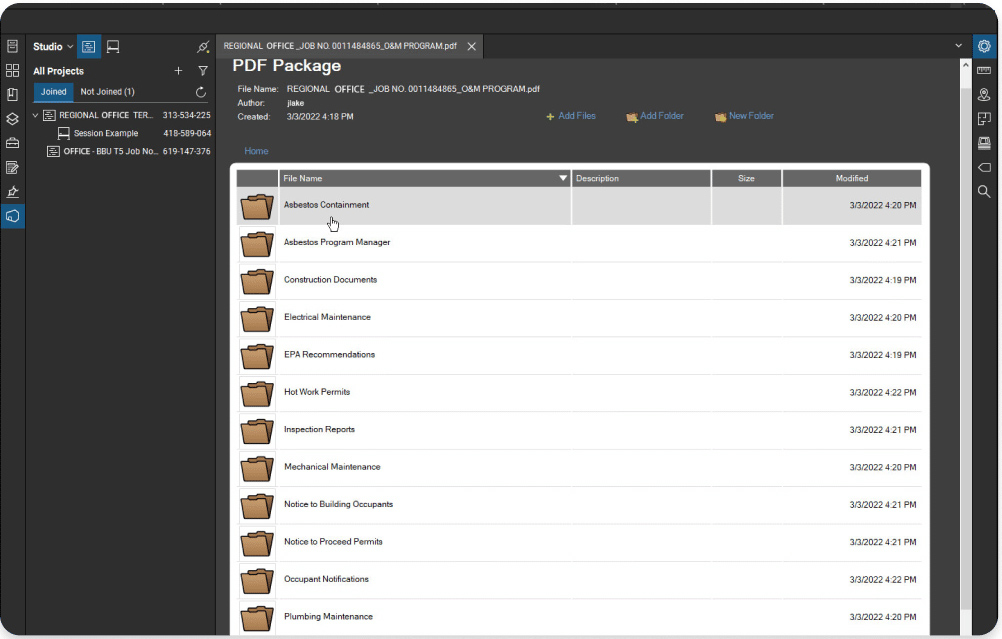
A computer screen displays a PDF package viewer with a file directory open. Multiple folders like Asbestos Containment and Construction Documents are listed, highlighting features common to construction takeoff software for contractors.

Digital Handover Document Assembly

Streamline closeout package creation

Organize warranties, specs, O&M manuals, and as-builts into comprehensive, hyperlinked digital packages using customizable templates and automated assembly tools.

  • Combine multiple document types into unified, navigable PDF sets with automated bookmarking
  • Add custom hyperlinks connecting related documents, specifications, and vendor information seamlessly
A digital site plan is displayed on a PDF markup software interface, showing parking areas, a central building, construction access, and labeled zones like Phase 3 Paving. Annotations and a navigation panel appear on the left.

Compliance Documentation Assembly

Streamline your regulatory submission processes

Organize inspection certificates, test reports, compliance documents, and warranties into structured packages meeting regulatory and client requirements with full traceability.
  • Create automated compliance checklist verification to ensuring no critical documents are missed during handover
  • Create standardized submission formats that meet local authority and client-specific requirements consistently
Software

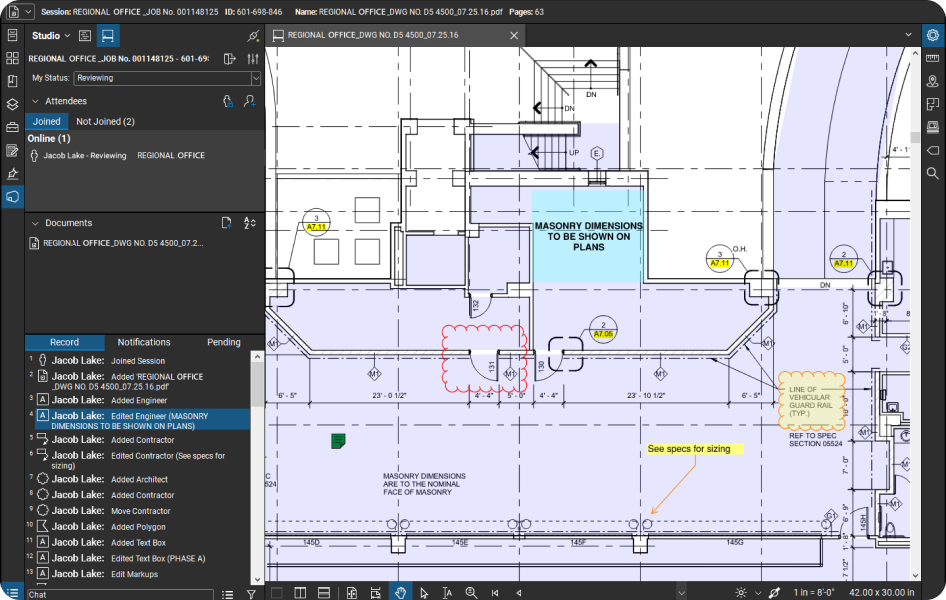
Real-Time Review Coordination

Accelerate stakeholder approval cycles dramatically

Use Studio Sessions to conduct live markup sessions with architects, engineers, contractors, and facility managers reviewing handover documents simultaneously from any location.
  • Enable simultaneous markups from multiple disciplines with color-coded feedback tracking automatically
  • Maintain complete audit trail of all comments, changes, and approvals throughout the handover process
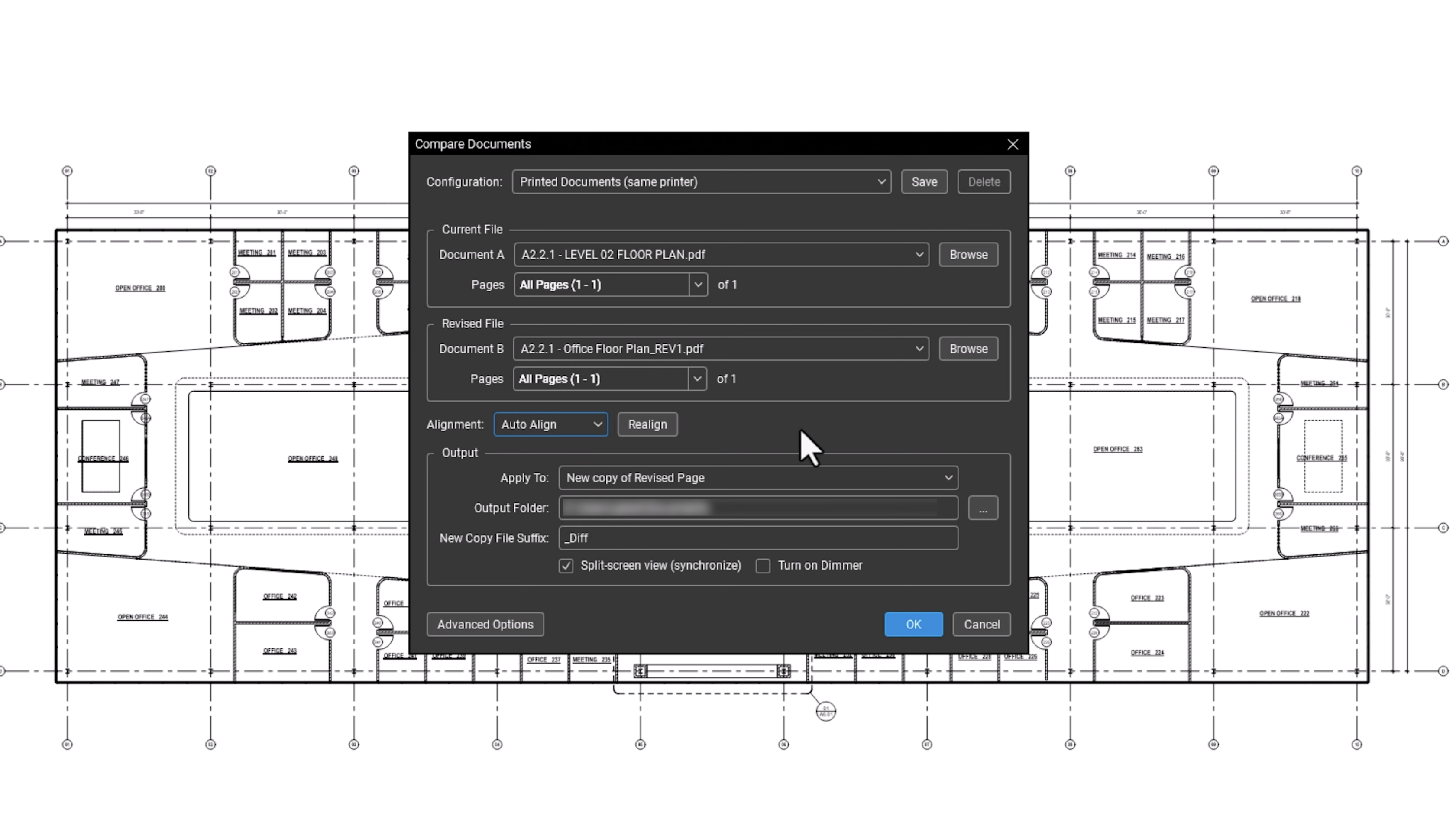
A software dialog box for comparing documents overlays a technical building floor plan. The dialog, ideal for contractor software, offers file selection, page range, alignment, and output profile settings, with OK and Cancel buttons at the bottom.

As-Built Documentation Management

Ensure drawing accuracy throughout construction lifecycle

Track design changes, field modifications, and final as-built conditions using markup tools and overlay comparison features for accurate project records.

  • Compare design revisions instantly using overlay tools to identify changes and discrepancies quickly
  • Create marked-up as-built drawings with field notes and photos integrated directly
A site plan created with construction collaboration software, showing labeled areas for gas main, recycling, staging area, trailer, waste, site fence, and water main in various colors. The map includes buildings, roads, parking areas, and construction access.

Facilities Handover Preparation

Deliver professional maintenance-ready documentation packages

Create interactive O&M manuals with direct links to equipment specifications, warranty information, and maintenance schedules for seamless facility management transition.

  • Build searchable equipment databases linked directly to drawings and maintenance documentation clearly
  • Generate custom handover reports with project-specific formatting and client branding requirements

Bluebeam gets better results:

Calendar Icon

80% O&M Package Assembly Time Reduction

CCI Mechanical reduced handover preparation from 2 days to 5 hours
Bluebeam performance stopwatch icon

60% Faster Punchlist Creation Process

DES Architects achieved 50-65% time savings in closeout documentation workflows
A simple icon of a presentation screen displaying a bar chart with three blue bars of increasing height and a black upward-trending line graph above them, symbolizing growth—ideal for illustrating construction management software.

60% Production Efficiency Increase

Hilson Moran achieved productivity gains through digital collaboration
Icon of a tablet displaying a blueprint in blue lines, with a tape measure in front, symbolizing architecture or interior design planning—perfect for illustrating construction management software.

1.5x faster reviews

Global giant Arup went digital with Bluebeam and cut design review time by 60%.

Integrations

Connect Bluebeam to your favorite tools.

Whether you’re using one of our ready-to-use integrations or building your own with Bluebeam Studio APIs, you can connect the applications you rely on for smoother workflows that keep projects moving.

Logos of Applications that integrate with Bluebeam Logos of Applications that integrate with Bluebeam

An industry standard software for over 20 years

See why customer reviews rank us as their top construction software.

Frequently Asked Questions

What is Bluebeam used for?

Do I have access to any learning or training resources during my trial?

Once I’ve completed my free trial, how much does Bluebeam cost?

How long is the Bluebeam free trial? Are there trial extensions available?

What features are available in the free trial version vs. the full subscription version of Bluebeam?

Does Bluebeam offer a discounted license for students or educators?

Try Bluebeam free for 14 days – no credit card required.